Calling and texting leads comes with rules. This page lists the protections AI Sync has today, in plain words, and links to the page that explains each one.
You stay responsible for your own compliance. AI Sync gives you tools and safe defaults. It can't know your lead's consent, your industry's rules or every state and country law. This page is not legal advice. Ask your lawyer what applies to your business.
At a glance#
| Rule | What AI Sync does | Where to set it |
|---|---|---|
| Texting opt-out (STOP) | A lead who replies STOP, or another opt-out word, is switched off for texts. Reps, workflows and the AI text assistant can't text them. AI agents stop calling them and the dialer leaves them out of its lists until they reply START. A STOP sent to your GoHighLevel number counts too. | Automatic. To see or change it, open the lead's Do not contact switches. Details |
| Texting opt-in (START) | START, UNSTOP or YES ends the call block their STOP caused. It turns texts back on only if the lead's own STOP turned them off. Any other block, such as the Calls switch or your Do Not Call list, stays. | Automatic. Details |
| Texting help (HELP) | A lead who texts HELP or INFO gets one reply with your business name, how to reach you and how to opt out. Your AI text assistant never answers it. | Automatic. Details |
| Do not contact, per lead | Switches for All, Calls, Texts and Email (the Inbox panel also has one for inbound calls and texts). Each one blocks that way of reaching the lead. Every change is logged. | Inbox side panel or the dialer contact card. Details |
| Do Not Call list | A number on your list is not called by AI agents or by a rep on the keypad. | DND Numbers, if your role can see it. Details |
| Do-not-call flag in your lead data | AI agents don't call a number your lead data marks as do-not-call, for example a DNC column from an import. | On by default. Each agent's Honor DNC scrubbing switch. Details |
| Do Not Call after a call | A rep who picks the DNC outcome marks the lead so the dialer doesn't call them again. | How did it go? after a call. Details |
| Calling hours, rep dialer | Lists skip leads outside their calling hours. The keypad refuses a number outside hours. | Automatic. Details |
| Calling hours, AI calls | AI calls wait for the lead's allowed hours. Do Not Call is checked first. Each AI agent also has its own schedule and allowed states. | Agent's Dialing Compliance tab. Details and agent settings |
| Caller ID | Local presence calls from a number you own that matches the lead's area code. Numbers flagged as spam are skipped when the dialer picks a number to call from. | Dialer's left-hand panel. Details |
| Texting registration (10DLC) | Carriers need your business registered before you text. If a carrier rejects your brand or campaign, AI Sync blocks automated texts until you fix it. | Setup → 10DLC. Profile, Brand, Campaign |
| Recording notice, transfer lines | A caller who dials a transfer line's number hears "This call may be recorded" before anyone rings. It's on by default. | The line's How it rings step. Details |
| Consent records | Lead forms save proof of consent with the page and time. Contact imports ask you to confirm consent first. | Website lead forms and Import contacts |
Texting: STOP and START#
AI Sync reads every reply a lead sends to one of your texting lines. If GoHighLevel is connected, it also reads STOP replies sent to your GoHighLevel numbers.
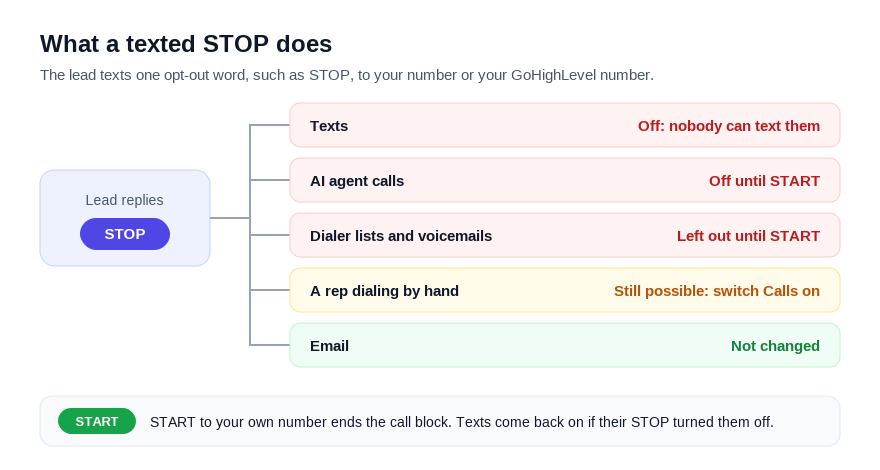
- STOP words: STOP, STOP ALL, STOPALL, UNSUBSCRIBE, CANCEL, END, QUIT, REVOKE, OPTOUT, OPT-OUT and OPT OUT.
- Whole message only. "Please stop calling me at work, text instead" is not an opt-out. A trailing full stop or exclamation mark is ignored.
- What happens. The lead's Texts switch goes on, so every send path refuses them. The AI text assistant doesn't answer. The change is logged.
- The confirmation reply. The lead gets one confirmation. On Twilio numbers, Twilio sends it. On iMessage lines, AI Sync sends it.
- AI calls and dialer lists stop too. AI agents don't call the lead, and the dialer leaves them out of its lists, until they reply START. This covers single AI calls, AI campaigns, workflow calls, calls your AI assistant starts and the voicemails the dialer leaves.
- A STOP to your GoHighLevel number counts too. It turns off texts and calls in AI Sync the same way. AI Sync also turns on Do Not Disturb for texts and calls on that contact in GoHighLevel.
- The Calls switch doesn't change. The block comes from the lead's own reply, so the lead's Calls switch stays as it was. AI campaigns quietly leave the lead out. A workflow's AI call step that skips them says "This lead texted STOP, so they will not be called until they text START."
- A rep can still dial them by hand. The keypad and a rep's own call-back click don't check STOP. If the lead doesn't want any calls, switch Calls on.
- Email is not affected. To stop email, switch Email on.
- Texts already off? If your team had already switched texts off and the lead then replies STOP, calls stop too.
- Your team's Texts switch on its own doesn't stop calls. "Stop texting me, call me instead" stays possible. Only the lead's own STOP blocks calls.
- START words: START, UNSTOP and YES. They always end the call block that the STOP caused. They turn texts back on only if the lead's own STOP turned them off. A block set by your team, an import or the Do Not Call list stays.
- START to a GoHighLevel number isn't picked up yet unless you use the GoHighLevel texting line. If a lead's STOP came in that way, turn their texts back on yourself, as below, when they ask to hear from you again.
- Turning texts back on yourself (switching Texts off and confirming the warning) also ends the call block that the STOP caused.
Carriers keep their own STOP list too. After you turn texts back on for a lead, the carrier may still block them until the lead replies START.
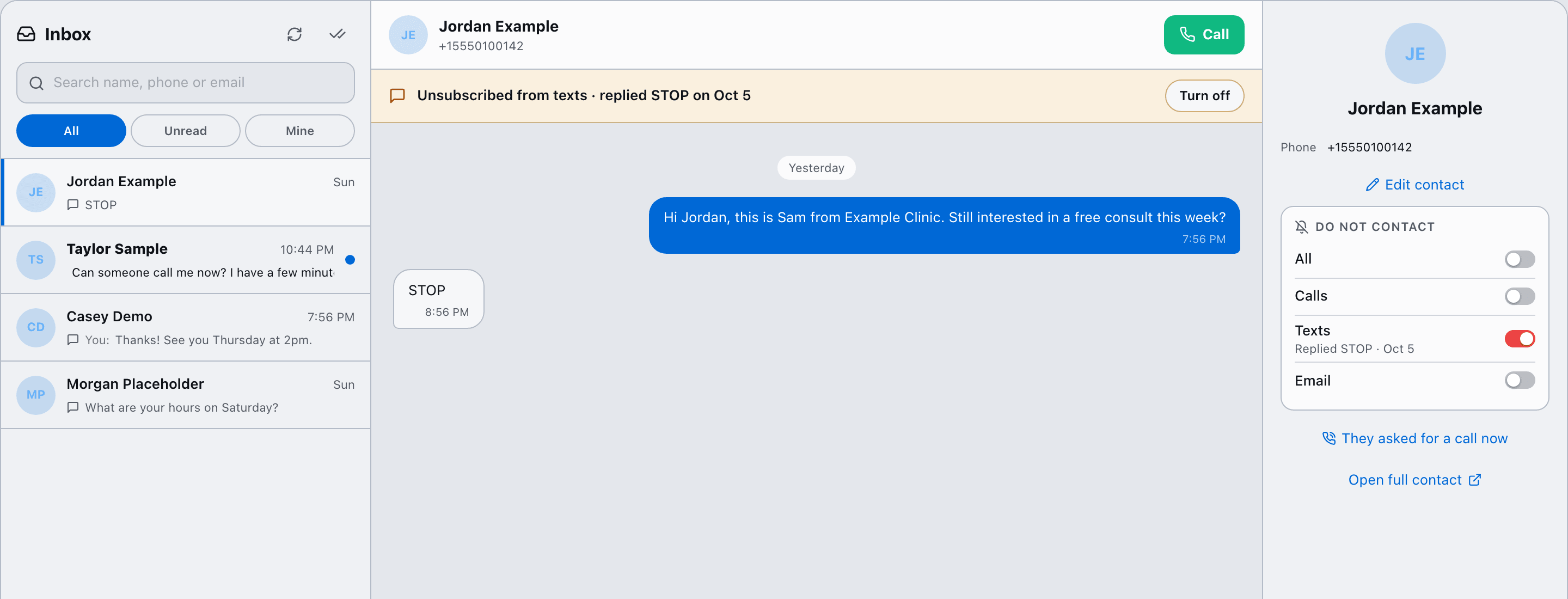
See Do Not Contact, STOP and START replies for the screens and the "text them again" warning.
Texting: HELP#
A lead who texts HELP or INFO to one of your Twilio numbers gets one reply:
Your business name: you are getting texts from us. For help, call or text the number they texted. Msg & data rates may apply. Reply STOP to opt out.
- Whole message only, like STOP. "Can you help me pick a time?" is a normal reply.
- Once a day at most per lead and number. The reply shows in the Inbox as a sent text.
- Your AI text assistant never answers HELP. HELP doesn't change any Do not contact switch.
- Your business name comes from your texting registration. Set it in Setup → 10DLC.
- If Twilio already answered HELP for that number, AI Sync doesn't send a second reply.
Do Not Call#
Do Not Call is checked before calling hours.
- Do not contact switches. All or Calls on a lead stops dialer calls and AI agent calls.
- Do Not Call list. AI agents check it before they call. A rep calling from the keypad is refused too.
- A texted STOP. AI agents don't call the lead and the dialer leaves them out of its lists until they reply START. A rep dialing by hand isn't stopped. See STOP and START.
- Do-not-call flag in your lead data. AI agents skip a number your lead data marks as do-not-call, unless you switch Honor DNC scrubbing off on that agent. See Dialing Compliance.
- The DNC outcome. Reps can mark a lead after a call.
A call request or a manual keypad call can change the hours rule for one call. Neither lifts Do Not Call.
Calling hours#
AI Sync works out where a lead is from their phone number's area code. It then allows calls only inside the legal calling window there. The usual window is 8am to 9pm in the lead's time. Some states are stricter, so AI Sync uses the tighter rule.
- Rep dialer, lists. Leads outside their hours are skipped, and the dialer moves on to the next lead. A lead whose area code can't be placed is called only while it's daytime across the whole continental US.
- Rep dialer, keypad. A number outside its hours is refused. The rep sees a Call anyway button. It asks them to confirm one manual call outside hours. The All and Calls switches and your Do Not Call list still apply.
- AI calls. A call outside hours isn't dropped. It waits and goes out at the lead's next allowed time. If a lead asks for a call right now, you can record a call request. It allows one call for a short time. See AI Calling Hours and Call Requests.
- Per AI agent. Each agent has its own calling days, hours and allowed states. See Dialing Compliance.
If a call didn't go out, check the workflow log or the AI campaign page. They say why, for example "Outside calling hours" or "On Do Not Call".
Caller ID and numbers#
Callers see the number you call from. Local presence uses numbers you own in the lead's area code. A number flagged as spam is left out when the dialer picks a number to call from. Watch your Declined and Screened counts for early warning. See Caller ID & Number Health and Spam Protected Numbers.
Texting registration (10DLC)#
US carriers expect businesses that text to register. In AI Sync that's Setup → 10DLC, in three parts: Profile, Brand and Campaign.
- Rejected: AI Sync blocks automated texts, such as workflow texts, until you fix the registration.
- Pending or not started: AI Sync doesn't block sending, but carriers may filter your texts.
Start early. Carrier approval can take from minutes to weeks. See Take a Client Live.
Recording notice#
A transfer line plays "This call may be recorded" to a caller who dials the line's number, before anyone's phone rings. The notice is on by default. You can turn it off with the Recording notice switch in the line's How it rings step.
- The notice doesn't play when an AI agent or a rep transfers a live call to the line. It would cut across the conversation.
- With the notice off, calls are still recorded. Telling callers is then up to you.
See Transfer Lines.
Consent#
AI Sync stores consent details on each contact: whether they agreed to texts, where the consent came from, and the date.
- Website lead forms. When your form shows consent text for calls and texts and the lead submits it, AI Sync saves the proof with the page it came from and the time. See Website lead forms.
- Contact imports. You must confirm you have consent before an import runs. If your file has a consent column, rows marked as not consenting are skipped. See Import contacts.
AI Sync records consent. It can't check that the consent is real or covers calls made with AI or automated technology. That is your responsibility.
Ask your AI assistant#
If your AI assistant is connected to AI Sync, you can ask it to review your setup. For example: "Check my Do not contact and calling hours settings and tell me what a lead can still be reached by."