The Incoming Call Routing feature lets you decide how inbound calls are processed. From Personal Settings, set the Incoming Call preference so calls go to the dialer, your phone, an AI agent, or a hybrid path.
⚙️ Configuration#
Update your incoming call route here:
👉 Profile → Personal Settings: https://app.aisync.link/profile
- Open the Personal Settings tab.
- Find the Incoming Call field.
- Choose your preferred routing option.
- Click Update to save (or Cancel to discard changes).
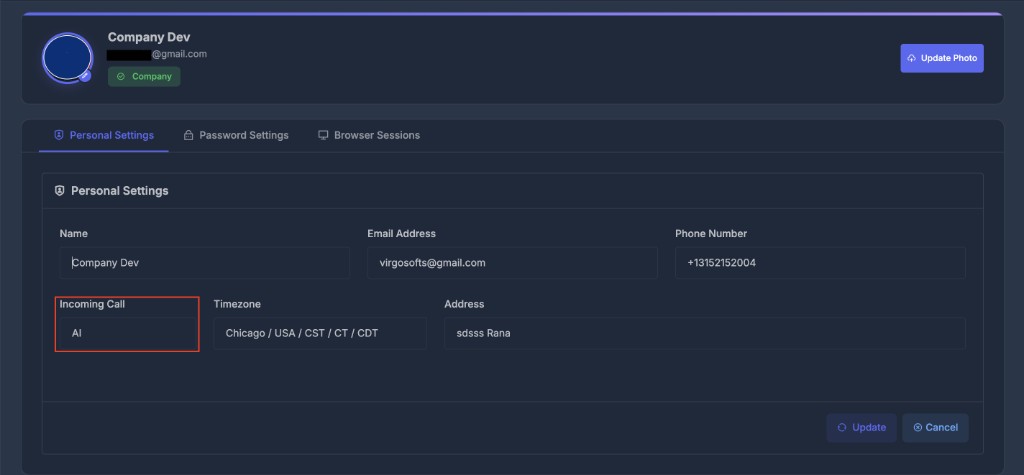
📞 Incoming Call options#
Dialer
Calls ring in the dialer interface so you or your team can answer them from within the app.
Phone
Calls forward to your linked phone number.
AI
Calls are routed straight to an AI agent, which handles the conversation automatically.
Dialer + AI
Calls first ring the dialer. If unanswered, the call goes to the AI agent as fallback.
🔍 How User Assignment Works#
Calls are always matched to a user before the selected Incoming Call option is applied. The system uses this logic (in priority order):
1️⃣ Last Outbound Call#
- If you have recently called the incoming number, you are selected as the responsible user.
2️⃣ Assigned Number#
- If the "To" number (the system DID receiving the call) is strictly assigned to a user, that user is chosen next.
3️⃣ PowerList Membership#
- If the caller belongs to a PowerList that you own, you receive the inbound call.
4️⃣ Company Default#
- If none of the above apply, the call defaults to the company’s fallback user.
As soon as a match is found, the system assigns the user, maximizing relevance and continuity.
🤖 If AI Is Involved#
If you pick an option that uses an AI agent (AI, or Dialer + AI as fallback):
-
Contact exists in a PowerList with an AI agent?
→ That PowerList's agent answers. -
Caller is unknown (not in any PowerList)?
→ The default PowerList AI agent handles the call.
Assign specific AI agents to different PowerLists for more tailored and effective conversations.
📊 Visual Flow#
👥 User Assignment#
Incoming Call
   ↓
Recent outbound user? → Yes: assign user
   ↓ No
DID assigned to user? → Yes: assign user
   ↓ No
Caller in user's PowerList? → Yes: assign user
   ↓ No
Fallback to default user
🤖 AI Routing#
AI needed?
   ↓
Caller in PowerList with AI agent? → Yes: use that AI
   ↓ No
Use default PowerList AI agent
🆕 What changed recently#
Inbound
A callback goes to the rep who actually spoke to that lead, not to whoever dialled them last. A missed dial no longer claims ownership of a lead, so reps stop inheriting each other's callbacks.
If that rep is busy, the call goes to whoever has been free longest, then to an AI agent if one is set up, then to voicemail. It never reaches dead air.
See What's New for the full history.