Create and manage your business profiles for compliant Application-to-Person (A2P) messaging across both Plivo and Twilio providers. Your 10DLC profile serves as the foundation for all messaging operations, ensuring regulatory compliance and optimal deliverability.
📊 Dashboard Overview#
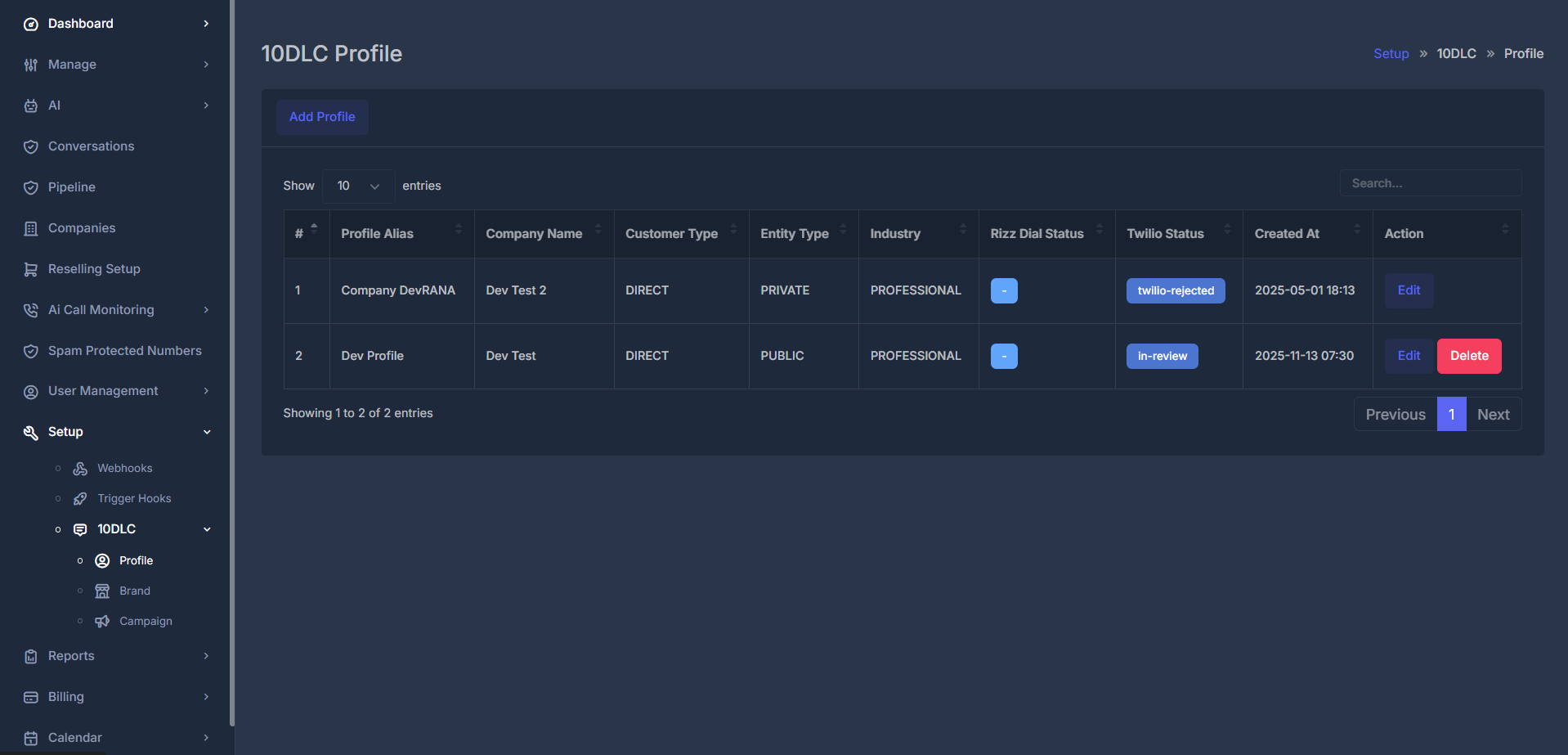
The 10DLC Profile dashboard gives you a clear, tabular view of all your business profiles and their compliance status. Below is a representative screenshot of the dashboard interface:
Profile Table Columns:
- Profile Alias: Internal friendly name for your profile (e.g., "Company MainProfile", "Demo Test")
- Company Name: Your business's legal name (must match registration)
- Customer Type: Select between "DIRECT" (registered business) or "RESELLER"
- Entity Type: Legal structure, such as "PRIVATE", "GOVERNMENT", etc.
- Industry: Select the industry classification for your business (e.g., "PROFESSIONAL")
- Rizz Dial Status: Displays the integration status of your profile with Rizz CMS, indicating if it's linked (toggle or icon).
- Created At: Date and time the profile was created
- Action: Options to edit or delete a profile (with confirmation)
Twilio Status Indicators:
- 🟢 Active/Approved: Profile active and messaging enabled
- 🟡 Pending: Awaiting review by carrier
- 🟠 In Review: Profile is under carrier examination
- 🔴 Twilio Rejected: Carrier denied the profile—review the provided feedback before resubmitting
- ⚫ Disabled: Profile deactivated; messaging blocked
Note: Use the "Add Profile" button to create a new 10DLC profile. Use the red "Cancel" button in Actions to remove the draft profile before completion.
For complete transparency, the dashboard also lists the total number of profiles and supports sorting by any field.
➕ Creating a New 10DLC Profile#
🚪 Step 1: Access Profile Creation#
- Navigate to Setup > 10DLC > Profile
- Click the "Add Profile" button
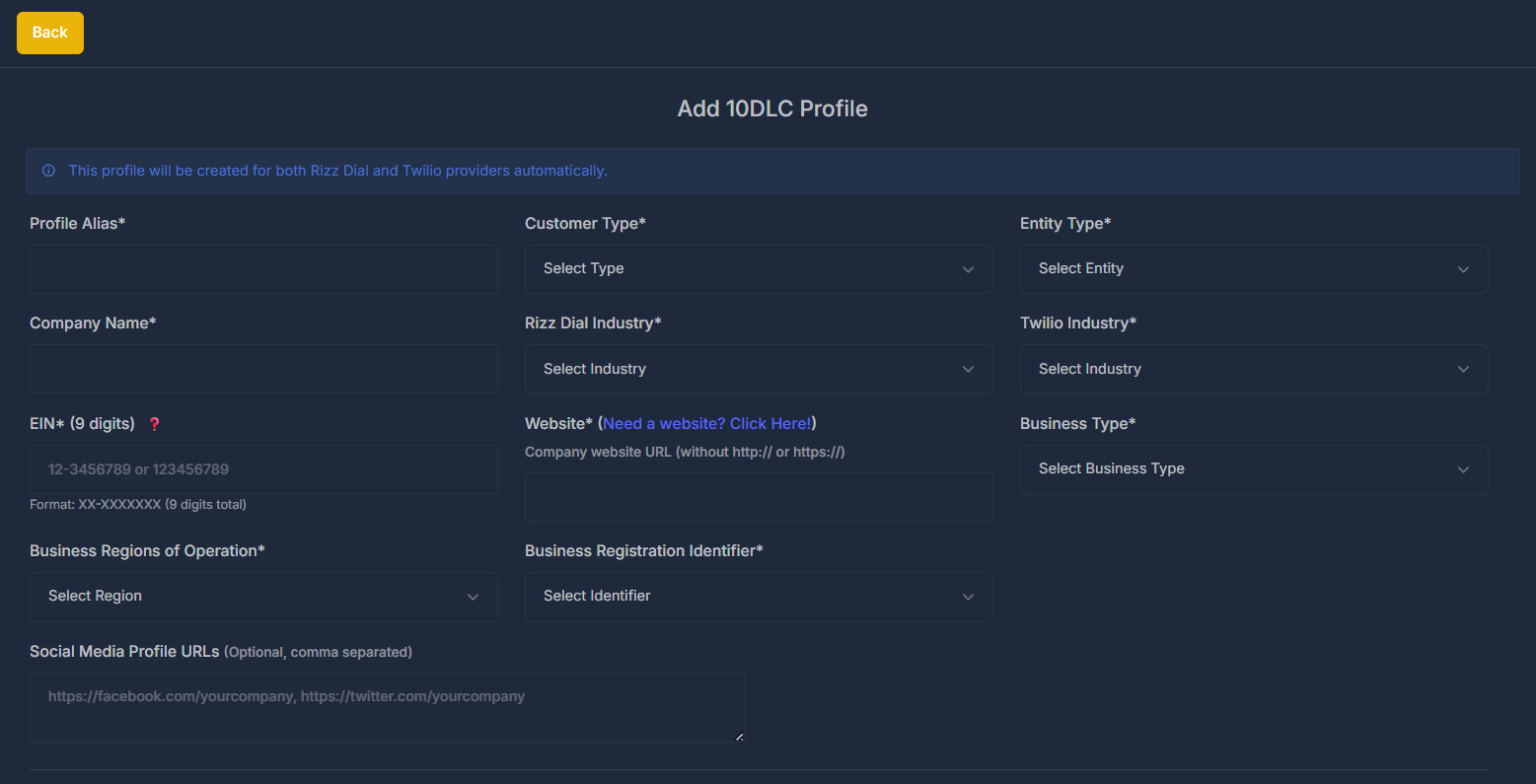
- The system will display the profile creation form
📝 Step 2: Complete Profile Information#
Basic Profile Information
Core Profile Details:

| Field | Description | Requirements | Example |
|---|---|---|---|
| Profile Alias* | Internal reference name | 3-50 characters, unique | "Main Business Profile" |
| Company Name* | Legal business name | Exact match to registration | "Volt Tech Solutions LLC" |
| EIN* | Federal Tax ID | 9 digits (XX-XXXXXXX) | "12-3456789" |
| Customer Type* | Business classification | Select from dropdown | "DIRECT" or "RESELLER" |
| Entity Type* | Legal structure | Must match documentation | "PRIVATE", "PUBLIC", "GOVERNMENT" |
EIN Format Validation: The system automatically validates EIN format and checks against IRS databases. Use format XX-XXXXXXX or XXXXXXXXX (9 digits total).
Critical Accuracy: Company name and EIN must exactly match your business registration documents. Mismatched information is the #1 cause of profile rejections.
Business Details & Industry
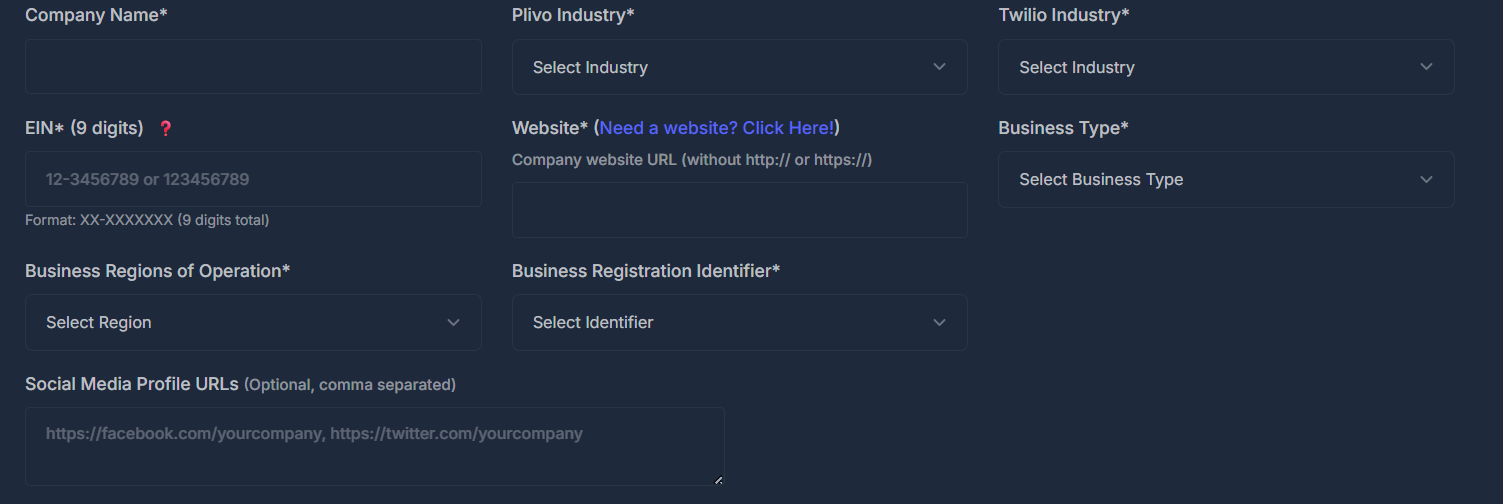
Industry Classification & Business Information:
| Field | Description | Impact on Approval | Best Practices |
|---|---|---|---|
| Plivo Industry* | Primary business vertical | Affects approval speed | Choose most specific category |
| Twilio Industry* | Secondary classification | Provider-specific optimization | Can differ from Plivo industry |
| Website* | Company website URL | High - validates legitimacy | Ensure site is live and professional |
| Business Registration ID* | Official business identifier | Required for verification | Use primary registration number |
| Business Type* | Detailed business structure | Affects compliance requirements | Match legal documentation exactly |
Industry Selection Guidelines:
High Trust Industries
- Technology/Software
- Healthcare
- Financial Services
- Education
- Approval Time: 2-3 days
Standard Industries
- Retail/E-commerce
- Professional Services
- Real Estate
- Manufacturing
- Approval Time: 3-5 days
Website Requirements: Your website must be live, professional, and include complete contact information. The system will automatically verify website accessibility during submission.
📍 Profile Address & Contact Details#
🏠 Address Information Section#
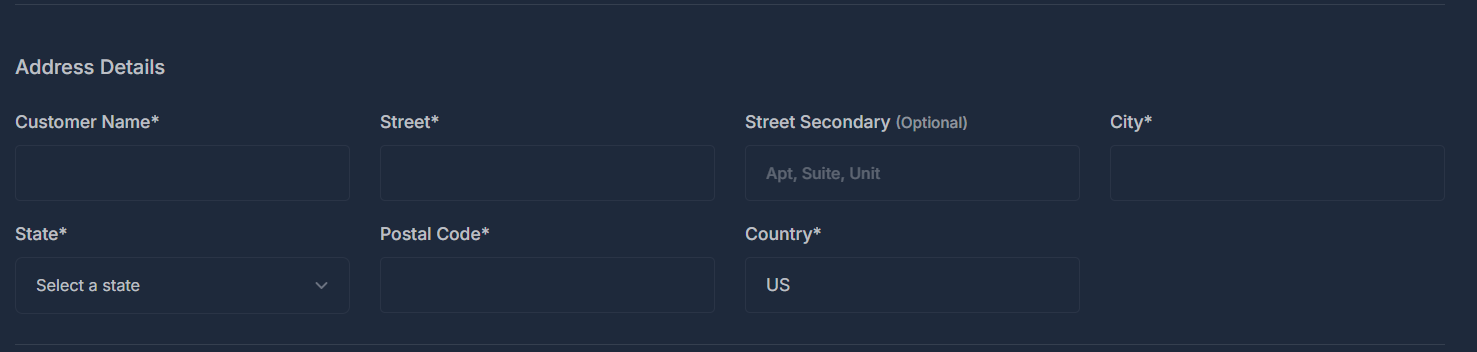
Required Address Fields:
| Field | Description | Validation Rules | Example |
|---|---|---|---|
| Customer Name* | Business name for address | Must match company name | "Volt Tech Solutions LLC" |
| Street* | Primary street address | No PO boxes, must be physical | "123 Business Ave" |
| Street Secondary | Additional address info | Optional | "Suite 100, Floor 2" |
| City* | Business city | USPS verified | "San Francisco" |
| State* | Business state | Valid US state | "California" |
| Postal Code* | ZIP code | 5 or 9 digit format | "94105" or "94105-1234" |
| Country* | Business country | Default: "US" | "United States" |
👤 Authorized Contact Details#
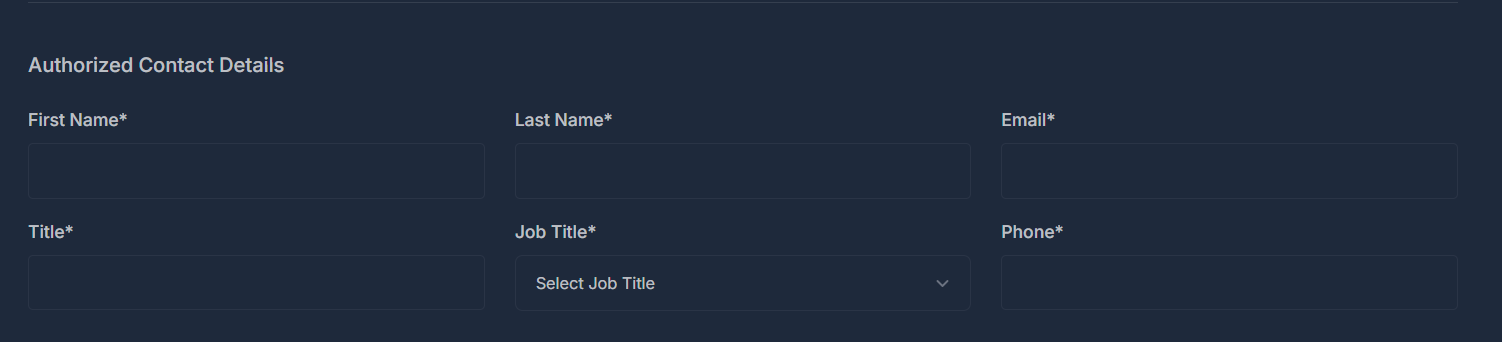
Contact Information Requirements:
| Field | Purpose | Requirements | Tips |
|---|---|---|---|
| First Name* | Primary contact person | Legal name, must be authorized | Use CEO, COO, or authorized agent |
| Last Name* | Contact surname | Must match government ID | Ensure spelling accuracy |
| Email* | Business email address | Business domain preferred | Use monitored email address |
| Title* | Contact's position | Business-appropriate title | "CEO", "Operations Manager" |
| Job Title* | Specific role | Select from dropdown | Choose most appropriate option |
| Phone* | Business phone number | Valid 10-digit US number | Use main business line |
ℹ️ Additional Business Details#
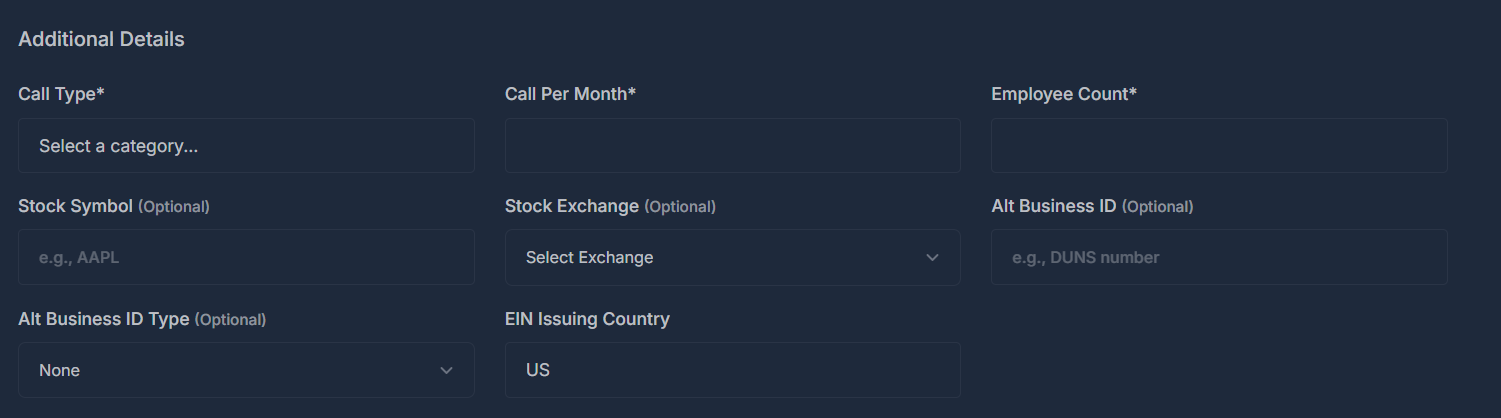
Supplementary Information:
| Field | Description | Impact | Requirements |
|---|---|---|---|
| Call Type* | Primary messaging use case | Affects approval category | Select from approved list |
| Call Per Month* | Expected message volume | Determines tier assignment | Realistic estimate required |
| Employee Count* | Company size indicator | Trust score calculation | Current employee count |
| Stock Symbol | Public company identifier | Optional for public companies | NASDAQ/NYSE symbol |
| Stock Exchange | Trading exchange | Required if stock symbol provided | Select appropriate exchange |
| Alt Business ID | Additional identifier | Optional verification | DUNS, LEI, or other ID |
| Alt Business ID Type | ID classification | Required if Alt ID provided | Select appropriate type |
| EIN Issuing Country | Tax authority country | Default: "US" | Country of tax registration |
✏️ Editing Existing Profiles#
⚙️ Profile Edit Interface#
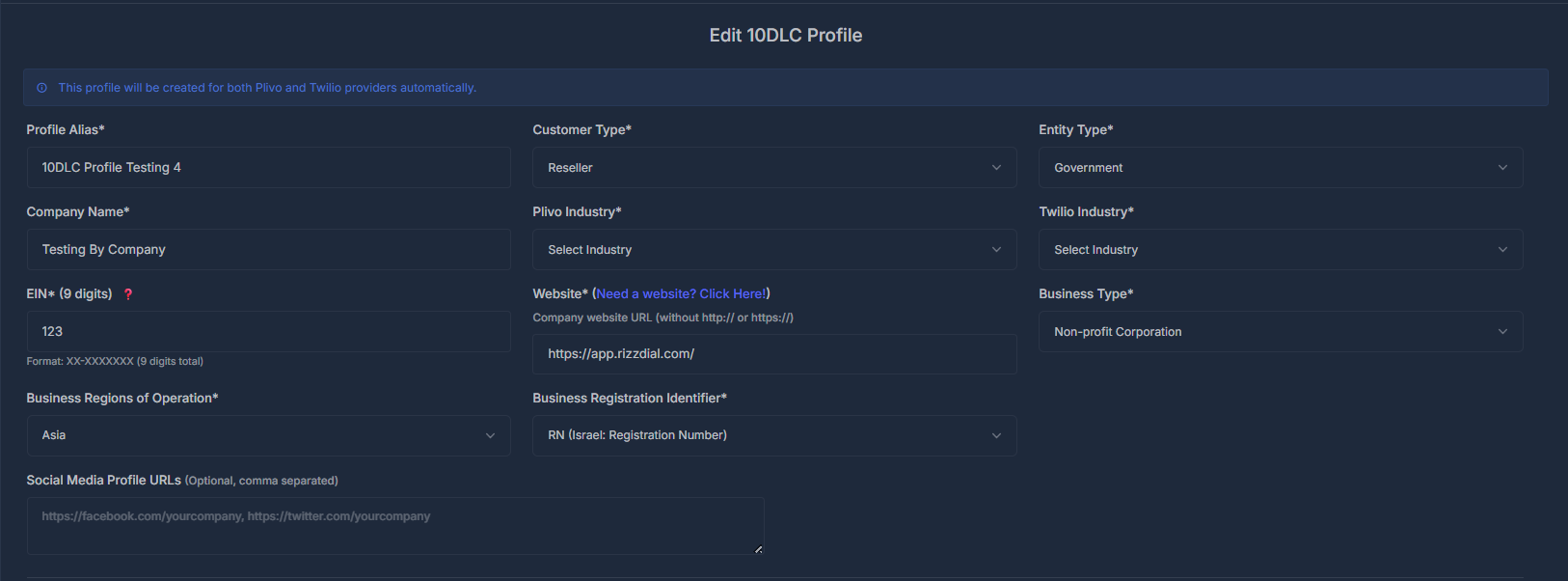
Edit Capabilities:
- Basic Information: Update company details and contact info
- Business Details: Modify industry classifications and website
- Address Updates: Change business address and contact details
- Additional Information: Update volume estimates and identifiers
Edit Restrictions:
- EIN Changes: Requires new profile creation
- Company Name: Major changes need re-verification
- Entity Type: Cannot be changed after approval
- Provider Settings: Read-only after initial setup
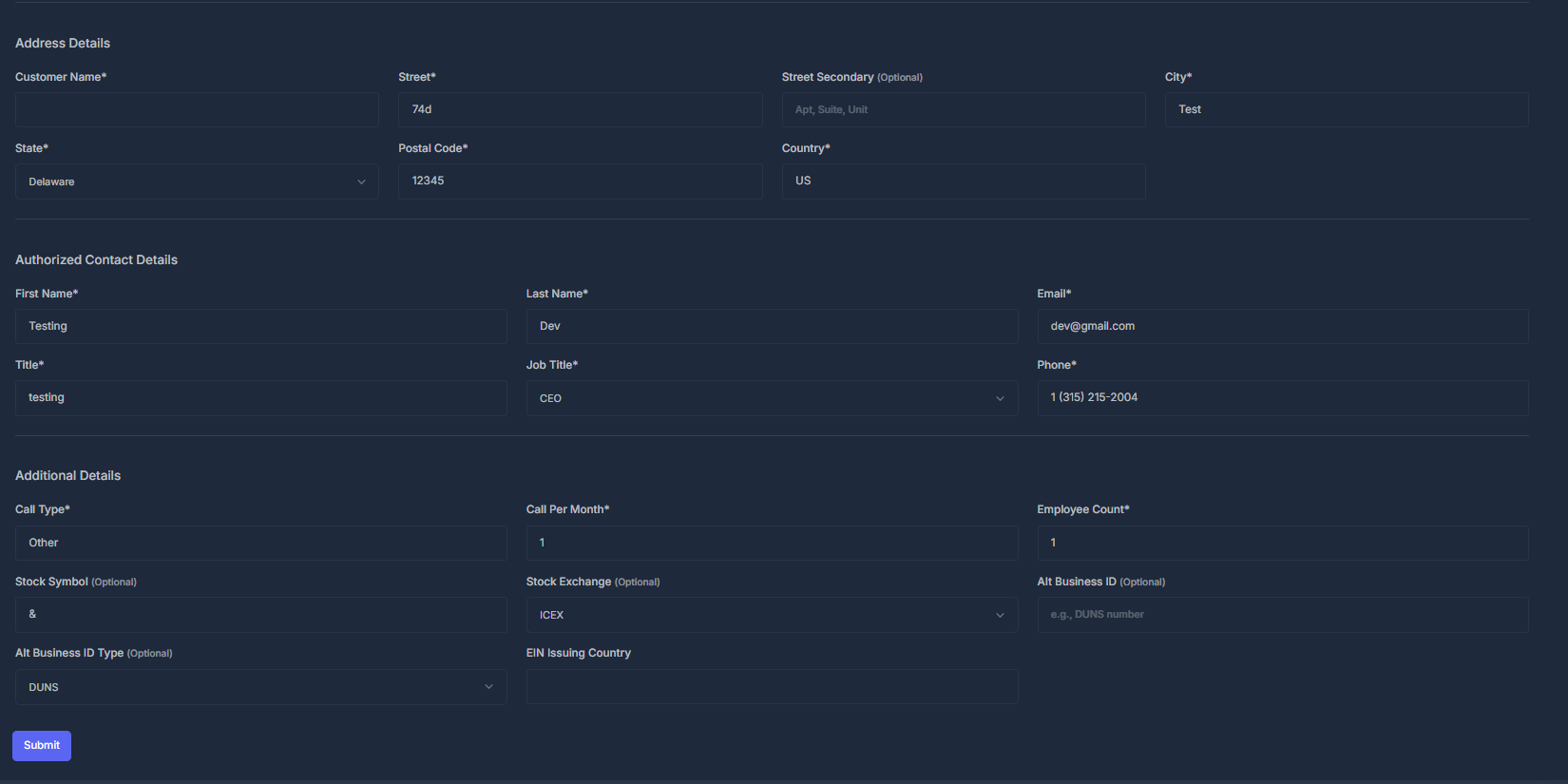
Additional Editing Options:
- Contact Details: Modify business phone numbers and email addresses.
- Brand Information: Change profile display name and public-facing details.
- Industry Classification: Update NAICS or SIC codes for your business.