Calls and texts follow different rules on purpose.
- Calls rotate. Your caller ID changes from dial to dial to protect your answer rate. See Caller ID and numbers.
- Texts never rotate. Each lead is texted from one number, and the reply goes to the rep who owns that conversation.
If texts followed the calling number, a lead would get every message from a different number and their replies would scatter. A texting line prevents that.
🧩 What counts as a texting line#
A texting line is either:
- A Beam number. Every active number in your connected Beam workspace. See Connect Beam.
- A Twilio number connected to AI Sync that shows A2P linked on the Phone Numbers page and isn't assigned to an AI agent. Carriers block texts from unregistered numbers. See 10DLC.
There are two kinds:
| Kind | Who texts from it |
|---|---|
| A rep's own line | That rep, and replies to it always go to them |
| Team line | Any rep who has no line of their own |
🗂️ Manage them all in one place#
Settings → Texting lines (also a Texting lines button on the Phone Numbers page) lists every number that can text, Beam and Twilio together. Pick who texts from each one and click Save.
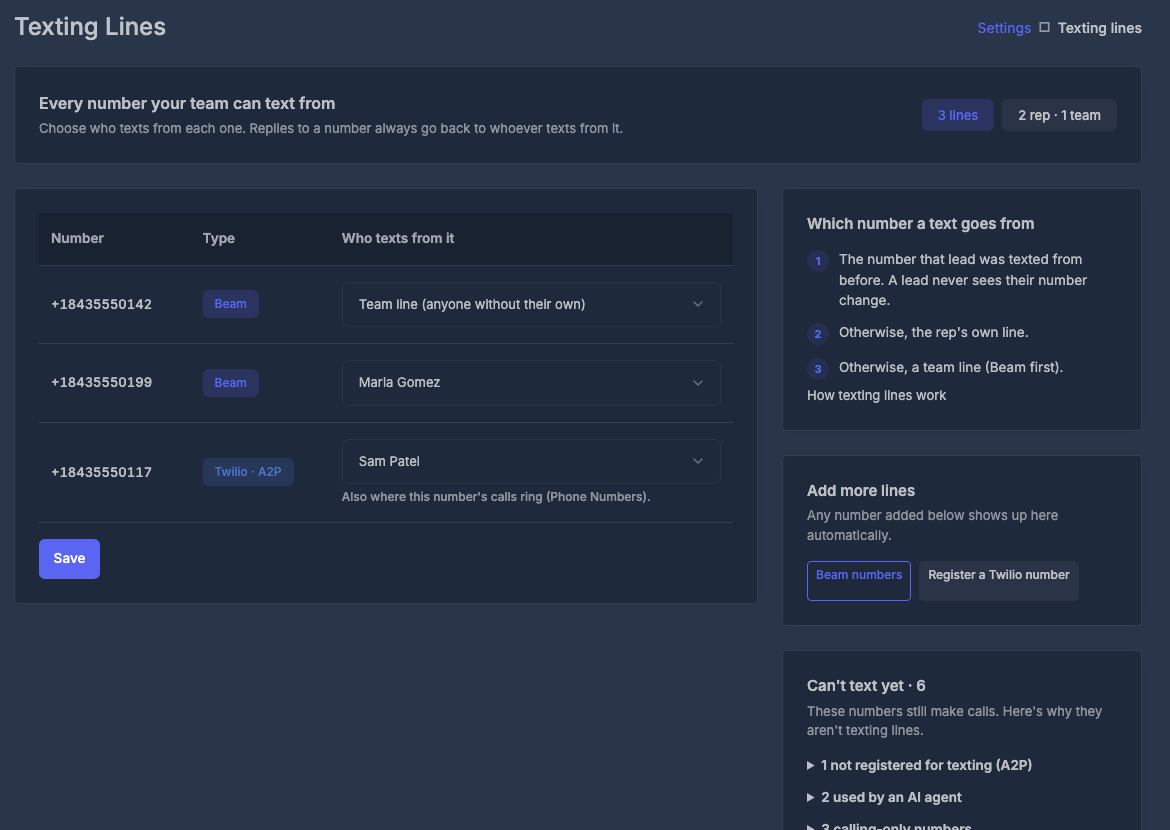
- It only decides who texts from a number and gets its replies. Where the number's calls ring stays on the Phone Numbers page.
- A Twilio number whose calls you routed to a rep starts as that rep's texting line. You can change it here.
- Can't text yet explains every other number: not registered for texting (A2P), assigned to an AI agent, or calling-only.
- Registered numbers missing? If you attached numbers to your campaign in Twilio's own console, click ↻ Refresh from Twilio at the top. AI Sync reads which numbers are really registered and updates the list. It also tells you about registered numbers you haven't imported into AI Sync yet.
- Reps can open the page too. They see which line is theirs but can't change anything.
The simplest good setup: one A2P-linked number per rep, each routed to that rep. Leads save a real person's number, and every reply lands with the right rep.
The cheapest setup: a single A2P-linked number left unrouted. Everyone texts from that team line, and replies still reach the right rep (see Where replies go).
If a rep has several lines, Beam comes first, then the first Twilio number you added. Among team lines: Beam's default number, then other Beam numbers, then Twilio numbers in the order you added them.
📤 Which number a text goes out from#
Every way of texting uses the same rule: the dialer's Text tab, Text them, the Inbox, the Messages page, automations, workflows and AI assistants.
The number you picked
If you choose a number in the From menu, that number is used. Reps can pick their own line or a team line, never a colleague's line.
The number this lead was last texted from
Once a lead has been texted, they keep that number. This is what stops a lead getting messages from a new number every time.
Your own line
For a lead nobody has texted yet, it's the line routed to you. For an automation, "you" is the rep who saved the disposition.
A team line
If you have no line of your own.
Nothing, with a clear message
If none of these exist, the text isn't sent and you see "No texting line set up." AI Sync never picks a random number.
When a lead changes hands, their number doesn't move with them. Texts keep going from the first rep's line, and replies keep going to that rep. To take a lead over, pick your line in the From menu once. From then on your line is that lead's number, and replies come to you.
Workflows and automations#
In a workflow's Send SMS step:
| From setting | What it does |
|---|---|
| Same as dial | The lead's texting line, using the rule above (the default). It no longer means "the number that last called them". |
| Assigned User Numbers | The same rule |
| A specific number | That number. If it isn't A2P linked, a linked number with the lead's area code is used, then any linked number. |
Dialer Automations use the texting line automatically.
📥 Where replies go#
When a lead replies, AI Sync picks one rep, in this order:
The owner of the number they replied to
If they replied to a rep's own line, it goes to that rep.
The last rep who texted or called them
Covers team lines. The rep who was talking to this lead gets the reply.
The lead's assigned rep
If nobody has contacted them from AI Sync yet.
The account owner
The safety net, so a reply is never dropped.
That rep sees the reply live in the dialer's Inbox with an unread dot and a count on the Inbox tab, plus a notification. The whole company's replies are also in the Messages page.
✅ Make sure replies actually reach AI Sync#
A text can go out perfectly while the reply goes somewhere else. The number's own reply setting decides where replies land.
Numbers added on the Phone Numbers page
Set automatically. When you import a Twilio number there, AI Sync points its calls and replies at itself.
Numbers inside a Twilio Messaging Service
A Messaging Service's own setting overrides the number's. If it sends replies to a webhook of its own, AI Sync never sees them.
In Twilio: Messaging → Services → your service → Integration → Incoming Messages, choose Defer to sender's webhook, and save.
If GoHighLevel also uses that Messaging Service, changing this setting changes where GoHighLevel gets its replies. Talk to support before you change it, and we'll set it up so both keep working.
Numbers brought in during onboarding
Don't assume these were pointed at AI Sync. Run the two-minute test below. If the reply doesn't show up, ask support to check the number's reply routing.
🧪 Two-minute test (do this for every new client)#
Text your own phone
In the dialer, open a contact with your mobile number and send a text from the Text tab. Check the From line shows the number you expect.
Reply from your phone
Reply with anything.
Watch the Inbox
Within seconds, the reply appears in the dialer's Inbox against that contact, with an unread dot, for the rep you expect.
Text again
Send a second text. It must go from the same number as the first.
Passed? Texting is set up correctly for that number. No reply after a minute? See the Messaging Service accordion above, then contact support.
🔧 Customize it#
| You want | Do this |
|---|---|
| Each rep texts from their own number | Settings → Texting lines: pick a rep for each number |
| Everyone texts from one company number | Leave one A2P-linked number unrouted |
| A rep takes over a lead | They pick their own line in From once |
| An automation always uses one number | Set that number in the workflow's Send SMS step |
| A number stays for an AI agent only | Assign it to the agent; it's never used as a texting line |
| Check what a lead will be texted from | Open the contact's Text tab and read From, or ask your AI assistant |
Setting this up with Claude, ChatGPT or Codex instead? See Texting & Inbox with your AI assistant.
🧯 If something is off#
"No texting line set up"
There's no Beam number and no A2P-linked Twilio number that isn't used by an AI agent. Connect Beam, or link a number to your 10DLC campaign on the Phone Numbers page.
Texts go from a number I didn't expect
That lead was texted from it before, and leads keep their number. Pick the number you want in From once.
A reply went to the wrong rep
Replies to a rep's own line always go to that rep. Check which number the lead replied to, and who that number is routed to on the Phone Numbers page.
Texts say sent but never arrive
Almost always 10DLC. Confirm the brand and campaign are approved, not just submitted, and the number shows A2P linked.
Replies never show up anywhere
The number or its Messaging Service sends replies somewhere else. See Make sure replies actually reach AI Sync.