🎯 What You Can Accomplish#
Our Companies management platform puts you in complete control of your business ecosystem. Whether you're onboarding new clients, tracking account performance, or customizing service packages, everything you need is at your fingertips.
🚀 Key Features#
- 🔄 Complete Account Lifecycle Management: From registration to activation, including status monitoring and account modifications
- 🔗 Multi-Service Integration: Seamless integration with dialer services, AI agents, and telephony features
- 🛡️ Advanced Access Control: Role-based permissions with secure authentication and audit trail capabilities
- ⚡ Real-time Operations: Live status updates, instant search functionality, and immediate configuration changes
- 📊 Business Intelligence: Comprehensive reporting, data export capabilities, and usage analytics
🔍 Company Listing Interface#
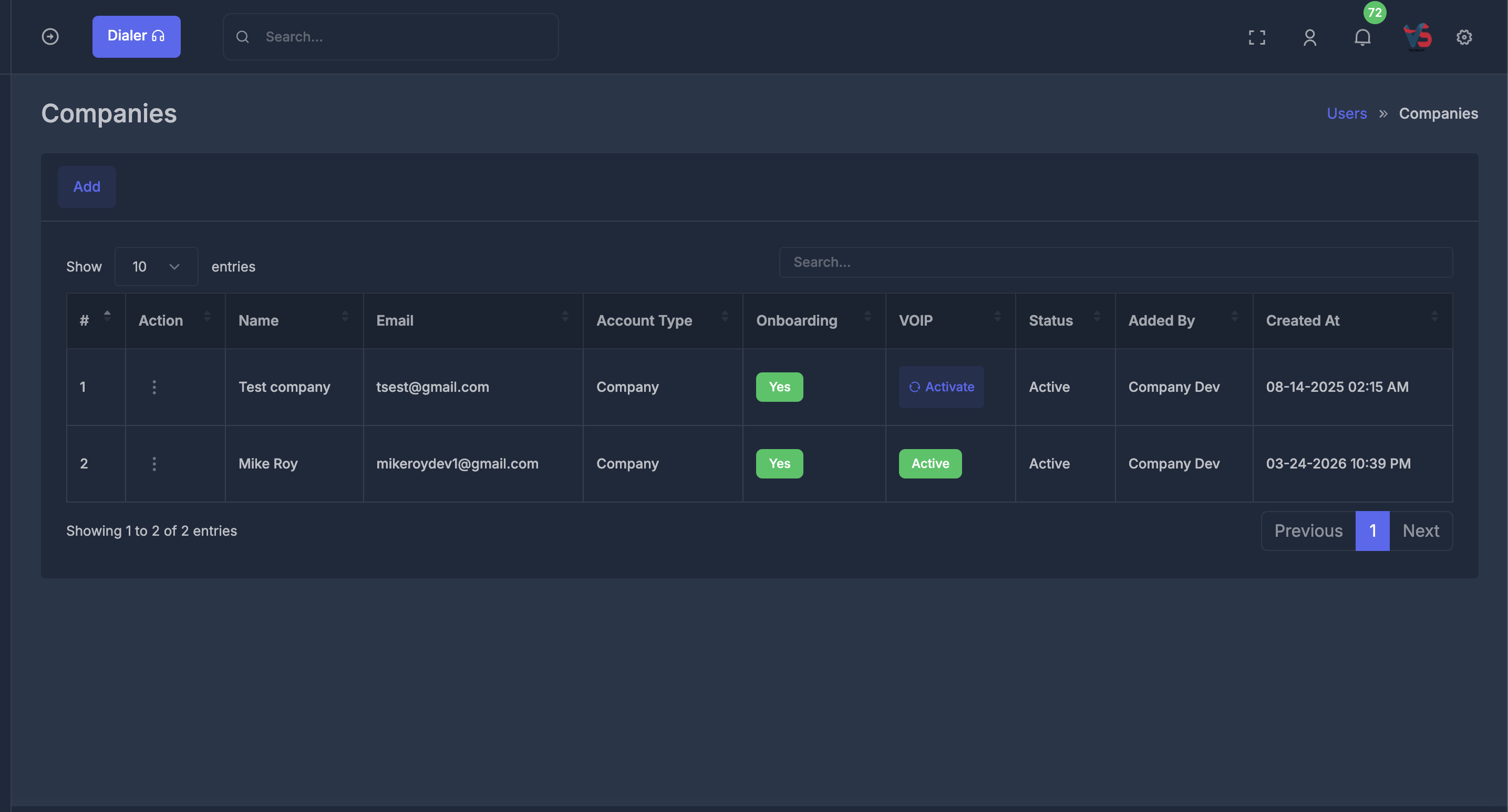
The main Companies dashboard provides a comprehensive view of all registered companies in your system. This interface serves as the primary hub for company management operations.
📊 Dashboard Features#
Navigation & Access
- 📍 Breadcrumb Navigation: Clear path showing
Users » Companiesfor easy navigation - 🔍 Search Functionality: Real-time search bar for quickly finding specific companies
📋 Data Columns#
| Column | Purpose | Description |
|---|---|---|
| # | Row Number | Sequential ID of each company in the listing |
| Action | Actions | Available actions: Login ,Manage subscription , Edit , Billing / Renewal , Balance / Add Money |
| Name | Company Name | Official registered name of the company |
| Company Email | Primary email for the company – used for login and communication | |
| Account Type | Type | Specifies the category (e.g., Company, Agency) |
| VOIP | VOIP Code / Identifier | System-generated unique VOIP code assigned to each company for telephony integration |
| Status | Account Status | Shows if the account is Active, Inactive, or Pending |
| Onboarding | Onboarding Progress | Indicates whether the company has completed onboarding steps; may show percentage or status such as Yes, No. |
| Added By | Added By | User who added or registered the company |
| Created At | Registration Date | Date and time when the company was registered |
🎛️ Action Controls#
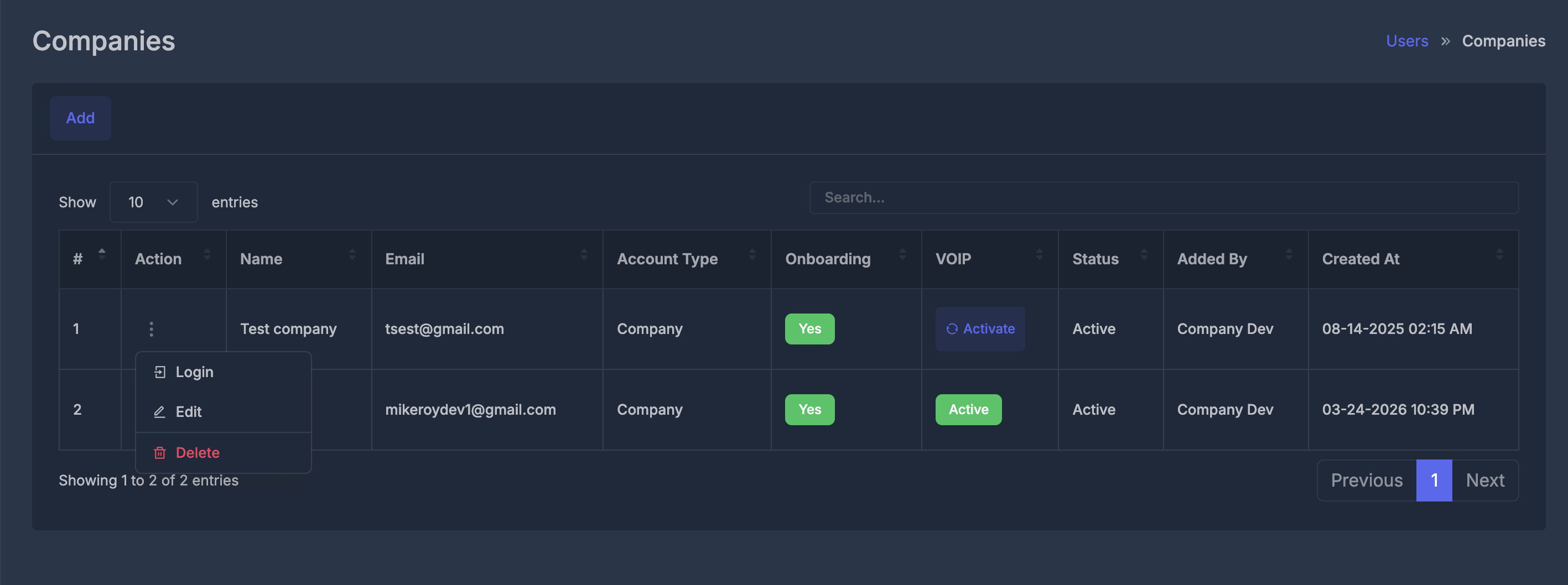 🛠️ Available Actions
- 🔑 Login: Access the company dashboard as that company (impersonation mode)
- ✏️ Edit: Update company information and configuration settings
- 🗑️ Delete: Remove a company account (action requires confirmation)
➕ Add Company Interface#
The Add Company form is a comprehensive interface for registering new business entities on your platform. This form captures all essential information required for company onboarding and account setup.
📝 Form Sections#
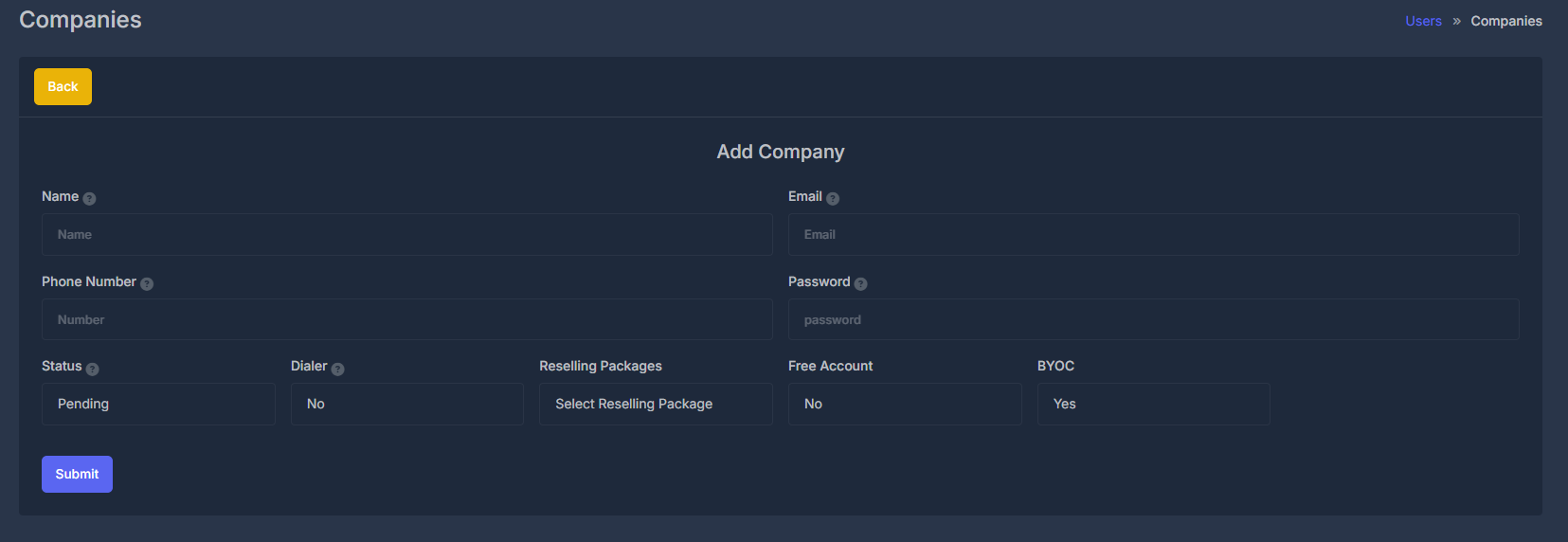 📋 Name Field
- Purpose: Official company name for identification
- Usage: Displayed across the platform for company identification
📧 Email Field
- Purpose: Primary communication and login credential
- Usage: Account access, notifications, and official communications
📞 Phone Number Field
- Purpose: Direct contact method for support and communication
- Usage: Support contacts, verification, and emergency communications
⚙️ Account Configuration
📊 Status Dropdown
- Options:
Pending- Account awaiting approvalActive- Fully operational accountInactive- Suspended or disabled account
- Purpose: Control account access and operational state
📞 Dialer Configuration
- Options:
Yes/No - Purpose: Enable/disable dialer functionality for the company
🧩 Service Configuration
📦 Reselling Packages
- Purpose: Assign service packages available to the company
- Usage: Determines available features and service limits
💰 Free Account Status
- Options:
Yes/No - Purpose: Designate whether the account has free tier access
- Usage: Controls billing, feature access, and service limitations
✅ BYOC (Bring Your Own Carrier)
- Options:
Yes/No - Purpose: Allow companies to use their own telecom carriers
- Usage: Enables integration with existing telecom infrastructure
🔧 Configuration Matrix#
| Setting | Options | Impact | Use Case |
|---|---|---|---|
| 🟢 Status | Pending/Active/Inactive | Account access | Account lifecycle management |
| 📞 Dialer | Yes/No | Calling features | Telephony service control |
| 💰 Free Account | Yes/No | Billing & features | Service tier management |
| ✅ BYOC | Yes/No | Carrier integration | Infrastructure flexibility |
✏️ Edit Company Interface
The Edit Company interface lets admins change company info and settings as needed.
📝 Editable Sections#
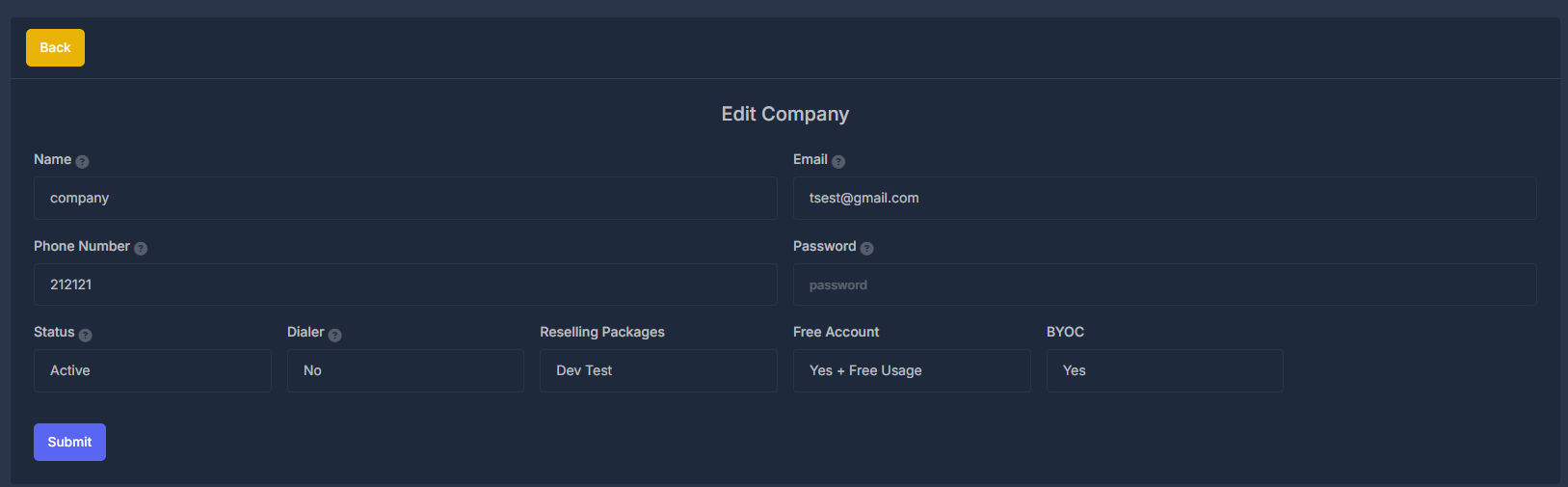
- Name: Update company name.
- Email: Change company email.
- Phone Number: Edit contact number.
Status: Set to Pending, Active, or Inactive.
Dialer: Enable or disable dialer (Yes/No).
Reselling Packages: Change assigned package.
Free Account: Toggle free tier access (Yes/No).
BYOC: Allow or remove carrier integration (Yes/No).
🛠️ Editable Settings#
| Setting | Options | Effect |
|---|---|---|
| Status | Pending/Active/Inactive | Access control |
| Dialer | Yes/No | Enable calling |
| Free Account | Yes/No | Free or paid account switch |
| BYOC | Yes/No | Carrier integration toggle |
🚀 Workflow & Usage#
🏭 Company Registration Process#
-
📝 Information Gathering
- Collect basic company information (name, email, phone)
- Set initial security credentials
- Configure account parameters
-
⚙️ Service Configuration
- Select appropriate reselling package
- Configure dialer access
- Set account type (free/paid)
- Configure BYOC if needed
-
✅ Review & Approval
- Account typically starts in "Pending" status
- Administrative review of company details
- Approval process activation
-
🎯 Account Activation
- Status change to "Active"
- Service provisioning
- Account access enablement
👩💼 Administrative Operations#
📆 Regular Management Tasks
- 📊 Monitor: Track company activities and usage
- 🔄 Update: Modify company information as needed
- 🎛️ Configure: Adjust service settings and packages
- 🔍 Audit: Review account activities and changes
📦 Bulk Operations
- 📥 Import: Bulk company creation from CSV/Excel
- 📤 Export: Generate reports and data exports
- 🔄 Update: Mass status changes and configuration updates
🔐 Security & Permissions#
🛡️ Access Control#
- 🔑 Role-based access: Different permission levels for various administrative roles
- 📝 Audit logging: Complete tracking of all company-related actions
- 🔒 Secure authentication: Encrypted password storage and secure login processes