Meta Ads lets you connect Facebook, manage campaigns and ads, check performance, and send Lead Form submissions into AI Sync as contacts.
Open from Marketing → Meta Ads, or Settings → Integrations → Facebook Lead Ads → Manage.
✨ What you can do#
- Connect Facebook and sync ad accounts, Pages, and Lead Forms
- Pause or activate campaigns and ads
- Review spend, clicks, leads, and cost per lead
- Turn on lead delivery and send forms into PowerLists
📑 Tabs at a glance#
| Tab | Use it to… |
|---|---|
| Overview | See connected account, businesses, and ad accounts |
| Ad Accounts | Pick which ad account to work on |
| Campaigns | Create, pause, or activate campaigns |
| Ads | Manage individual ads and creatives |
| Analytics | View spend and results by date range |
| Pages & Lead Forms | Turn leads on, assign PowerLists, map fields |
🔌 Connect Facebook#
Connect
Go to Marketing → Meta Ads (or Integrations) → Connect Facebook → sign in and approve permissions.
Sync
Click Sync Assets to pull ad accounts, Pages, and Lead Forms.
Select account
Choose an Ad Account from the top dropdown.
Turn on leads
Open Pages & Lead Forms → turn Leads On for your Page.
Use a Facebook login with admin access to your Pages and ad accounts. A personal login without business access may show an empty page.
🛠️ Top bar buttons#
| Button | When to use |
|---|---|
| Ad Account | Switch which account you are managing |
| Sync Assets | Refresh data after changes in Facebook |
| Reconnect | Fix expired permissions |
| Disconnect | Unlink Facebook from this workspace |
📝 Overview#
Quick snapshot of your Meta connection — not for editing ads.
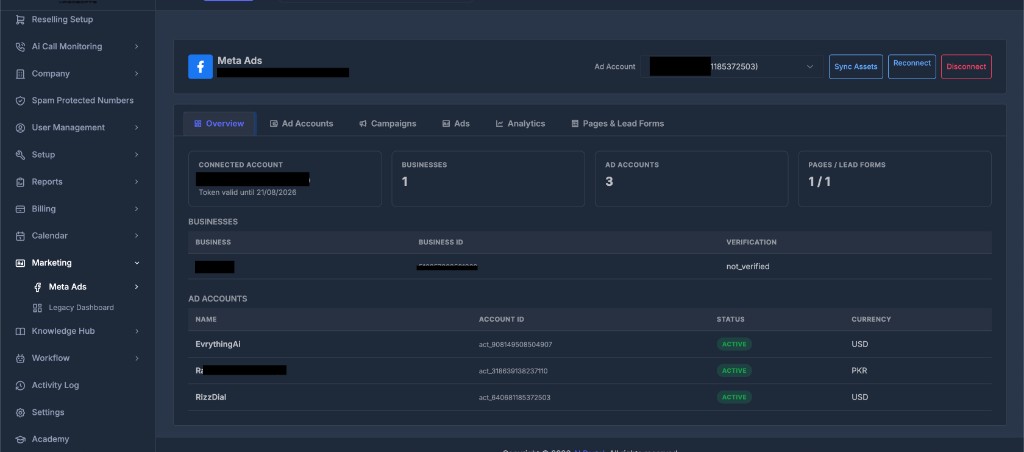
You will see:
- Connected Account — Facebook name and token expiry
- Businesses / Ad Accounts / Pages — summary counts
- Tables listing businesses and ad accounts with status and currency
Numbers look wrong? Click Sync Assets.
💼 Ad Accounts#
Pick the ad account for campaigns, ads, and analytics.
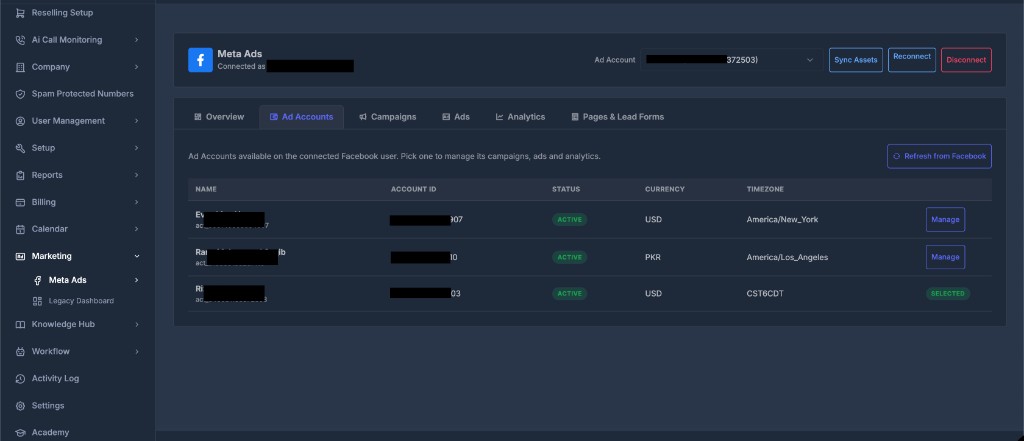
| Column | Meaning |
|---|---|
| Name | Ad account name |
| Account ID | Meta account ID |
| Status | Active, Disabled, etc. |
| Currency / Timezone | Billing and reporting settings |
- Click Manage to use an account
- Selected means it is active in the header dropdown
- Click Refresh from Facebook to update the list
📣 Campaigns#
Create and control campaigns for the selected ad account.
| Column | Meaning |
|---|---|
| Campaign | Name and Facebook ID |
| Objective | Leads, Traffic, Sales, etc. |
| Status | Your switch — Active or Paused |
| Effective Status | What Facebook is actually doing |
| Actions | Rename, Pause, or Activate |
Create a campaign
- Select ad account → Create Campaign
- Enter name and choose objective
- Click Create Campaign
New campaigns start Paused. Nothing spends until you click Activate.
- Click the arrow on a row to expand and view Ad Sets
- Pause = stop spend fast | Activate = confirm to start delivery
🖼️ Ads#
Manage individual ads. Filter by campaign or ad set.
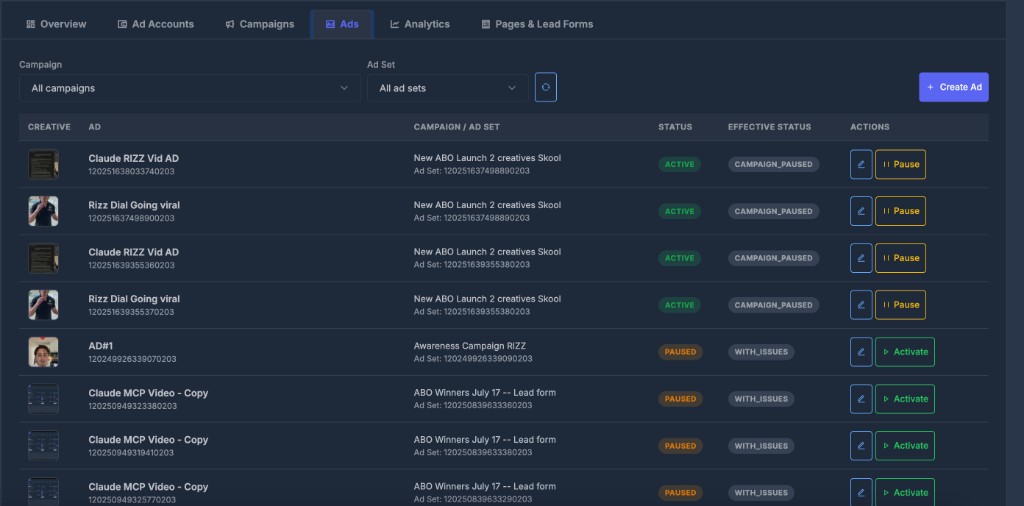
| Column | Meaning |
|---|---|
| Creative | Ad image thumbnail |
| Ad | Ad name and ID |
| Campaign / Ad Set | Parent campaign and ad set |
| Status | Active or Paused (your switch) |
| Effective Status | Real delivery state (e.g. CAMPAIGN_PAUSED) |
| Actions | Edit, Pause, or Activate |
Create an ad
- Create Ad → enter name
- Pick Campaign → Ad Set → Creative (must exist in Facebook first)
- Click Create Ad
New ads start Paused. Creatives are built in Facebook Ads Manager — AI Sync reuses them, it does not design them.
📊 Analytics#
Performance for the selected ad account and date range.
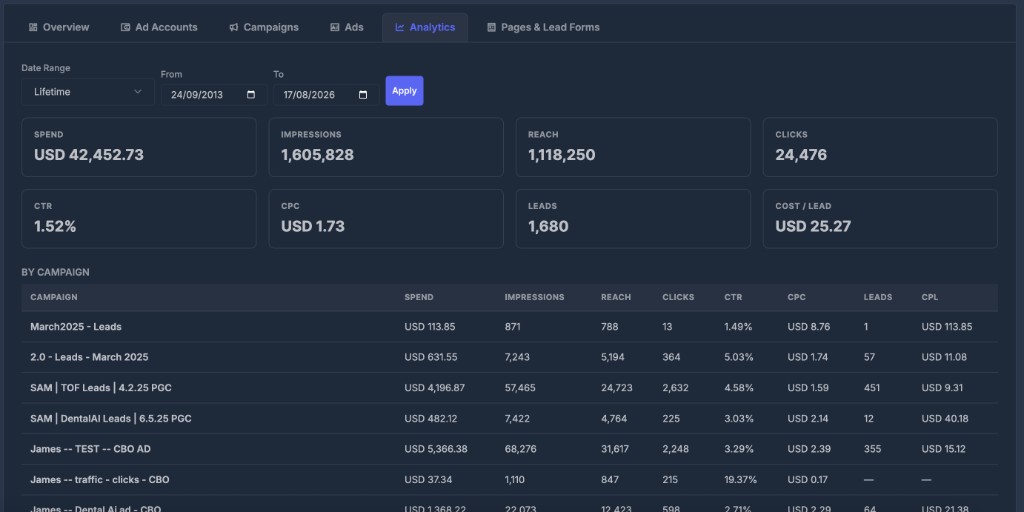
Filter: Pick Date Range (or custom From/To) → click Apply
Summary cards: Spend · Impressions · Reach · Clicks · CTR · CPC · Leads · Cost / Lead
By Campaign table: Same metrics broken down per campaign.
Use PowerLists to see leads that actually arrived in AI Sync. Analytics shows what Facebook reported — they can differ.
📄 Pages & Lead Forms#
Turn Facebook form fills into contacts you can call or text.
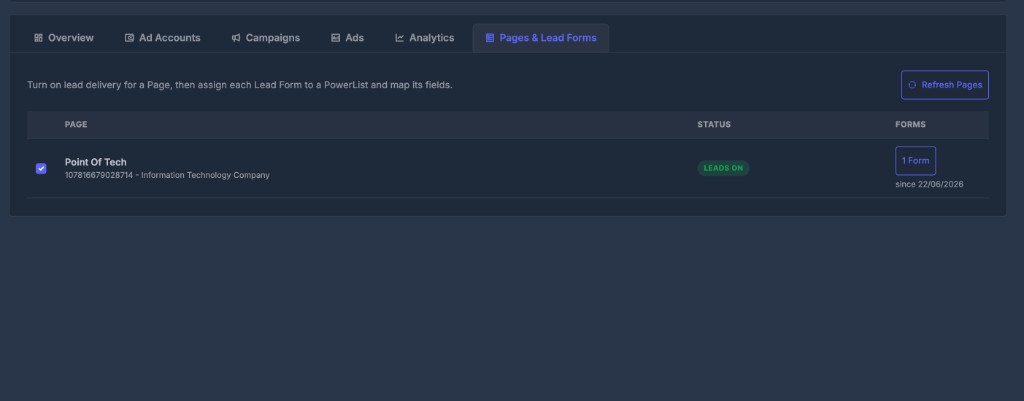
| Column | Meaning |
|---|---|
| Page | Facebook Page name and ID |
| Status | Leads On or Off |
| Forms | Number of Lead Forms — click to open |
For each form:
- Turn Leads On for the Page
- Click Forms → assign a PowerList
- Click Map Fields → match Facebook questions to contact fields → Save Mapping
| Facebook question | Map to |
|---|---|
| Full name | Name fields |
| Phone | Phone |
| City / State / Zip | Address fields |
Leads need all four: Leads On + PowerList + field mapping + Facebook connected. Map phone and email for follow-up to work.