S3 Storage lets your company connect an external cloud storage bucket to RizzDial. Once configured, uploaded files can be saved in that bucket instead of keeping everything only on the application server.
☁️ Why use S3 Storage?#
S3 Storage makes file storage more reliable, scalable, and easier to manage.
| Benefit | What it means for you |
|---|---|
| One secure location | Uploaded files live in your cloud bucket, not scattered on the app server |
| Stable file links | Files can be opened through consistent public or controlled URLs |
| Less risk during maintenance | Server updates or deployments are less likely to affect stored files |
| Organized by company | Files are separated by company and feature area |
| Room to grow | Supports larger file usage as your account expands |
Inside this tab, you will see the S3 Storage Configuration form with fields for your bucket name, region, access key, secret key, and bucket URL.
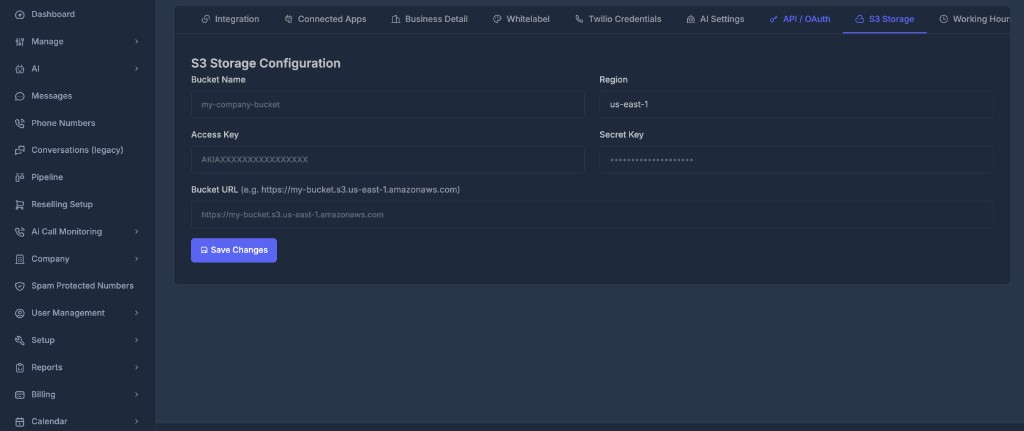
📝 What you need before setup#
Before saving S3 Storage in RizzDial, make sure you already have:
- A cloud storage bucket created in Amazon S3 or an S3-compatible storage provider
- The bucket name
- The bucket region
- An access key
- A secret key
- The bucket URL
- Permission for the access key to upload, read, and delete files in the bucket
If your company uses Amazon AWS, these details are usually created inside the AWS account. If you use another S3-compatible provider, the same type of information is normally available in that provider's storage dashboard.
📄 Field guide#
🗂️ Bucket Name
The name of your storage bucket.
Example: if your company created a bucket named my-company-files, enter that name here. This tells RizzDial where files should be stored.
🌎 Region
The region where the bucket is hosted — for example, a US, Europe, or Asia region.
The region must match the bucket's real region. If it is wrong, uploads may fail. When unsure, check your storage provider dashboard.
🗝️ Access Key
Like a username for the storage bucket. RizzDial uses it to identify the storage account when uploading or deleting files.
🔒 Secret Key
Like a password for the storage bucket.
🔗 Bucket URL
The web address used to open files after they are uploaded — for example, https://my-bucket.s3.us-east-1.amazonaws.com.
If this URL is incorrect, files may upload but links may not open correctly.