Predictive dialing for live human reps is available now. The engine paces a shared list across your floor instead of each rep picking their own lines. It takes two deliberate steps to switch on and has hard safety limits — see Predictive pacing.
New to the numbers? Start with How calls actually work.
📞 Voice Campaigns#
Open the Voice Campaigns page to create, monitor, and manage outbound calling campaigns:
https://app.aisync.link/manage/voice_campaign
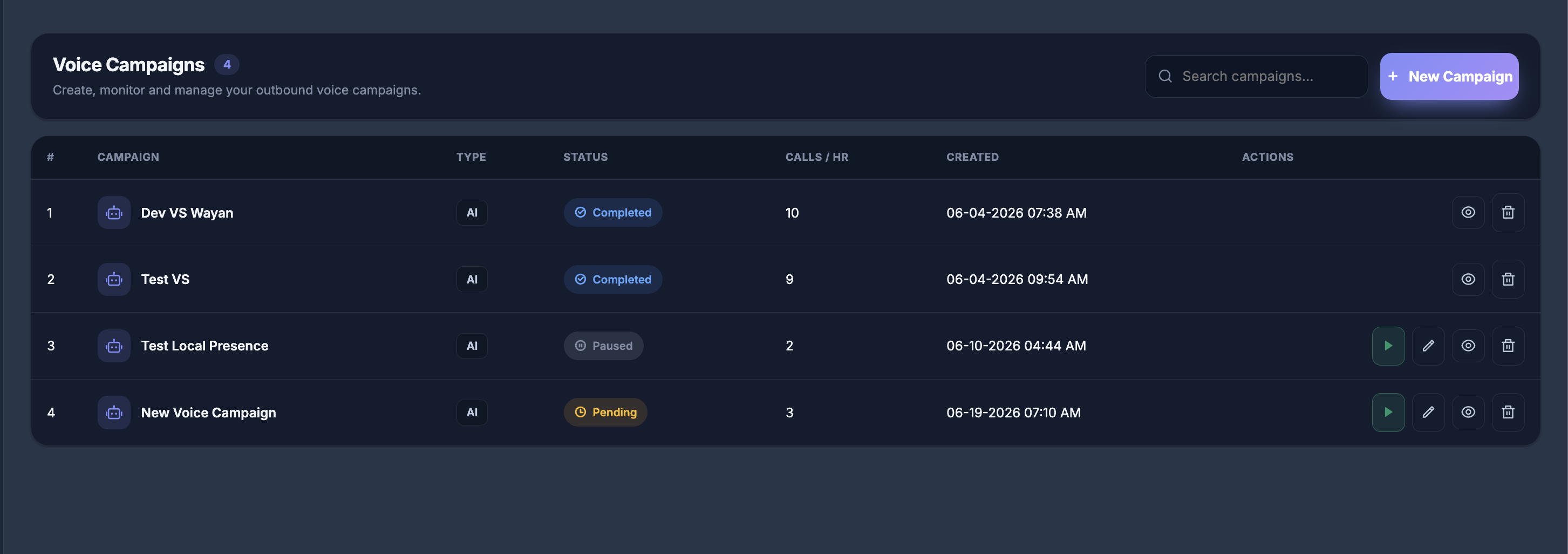
Top actions
- Search campaigns… — find campaigns by name.
- + New Campaign — open the Voice Campaign Builder.
Table columns
| Column | Description |
|---|---|
| Campaign | Campaign name (AI campaigns show a robot icon). |
| Type | Campaign engine — for example AI. |
| Status | Current state — Pending, In Progress, Paused, or Completed. |
| Calls / HR | Target calls per hour for the campaign. |
| Created | Date and time the campaign was created. |
| Actions | Start, edit, view report, or delete (availability depends on status). |
🚀 Launch a Voice Campaign#
Select + New Campaign to open the Voice Campaign Builder.
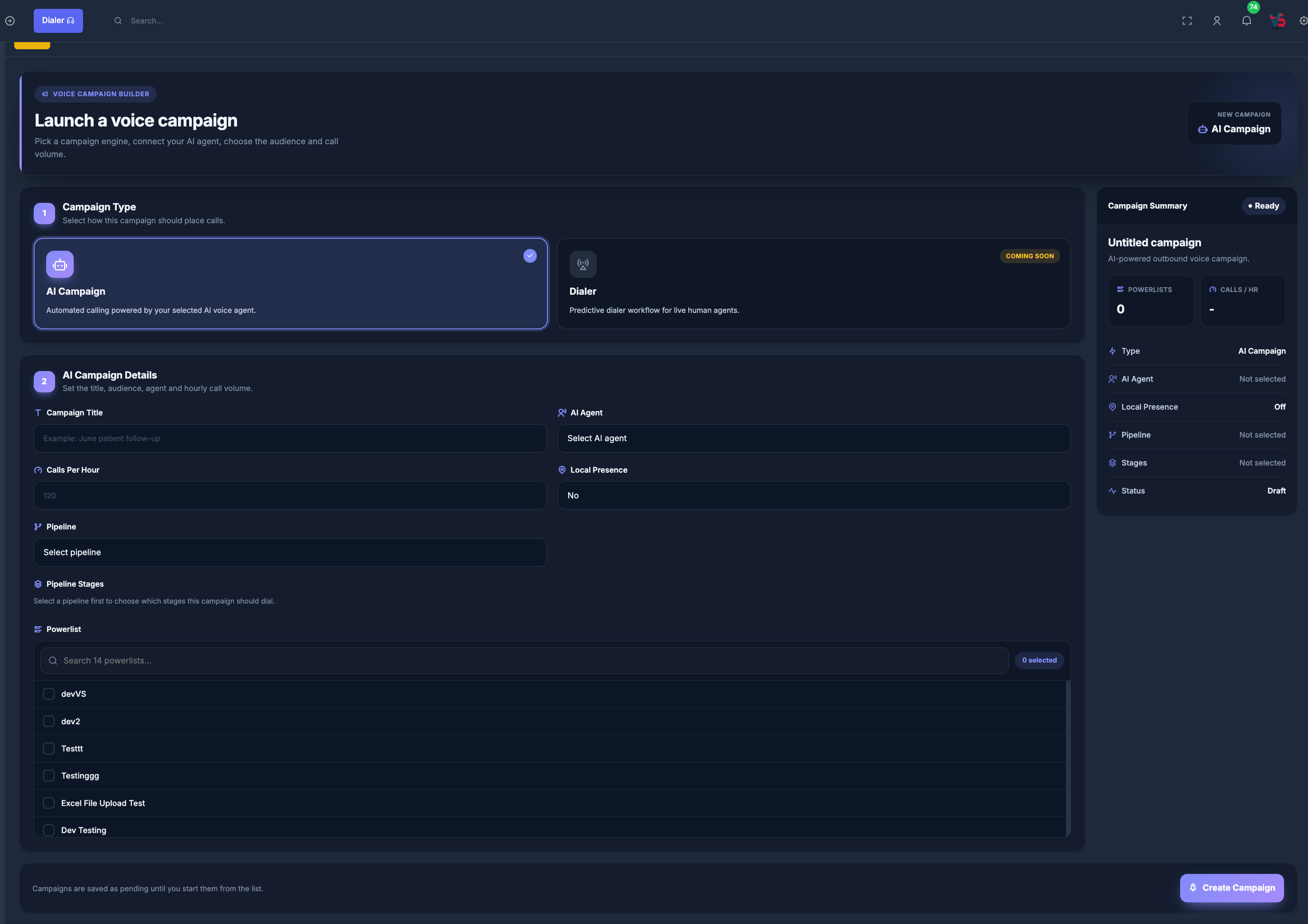
📝 Step 1 — Campaign Type#
Choose the campaign engine:
- AI Campaign — automated calling powered by your selected AI voice agent. Available for new campaigns.
- Dialer — predictive dialer workflow for live human agents. Shown as Coming Soon.
🧠 Step 2 — AI Campaign Details#
Fill in the following fields:
Campaign Title Enter a clear name for your campaign (e.g., "June patient follow-up").
AI Agent Select the AI voice agent that will place or handle the calls.
Calls Per Hour
Set how many calls the campaign should attempt each hour (e.g., 120).
Local Presence
Choose whether to use local presence dialing (Yes or No).
Pipeline Select the pipeline this campaign should use.
Pipeline Stages After choosing a pipeline, select which stages the campaign should dial.
Powerlist Select one or more contact lists. Use search to find lists, then check the ones to include. A badge shows how many powerlists are selected.
The Campaign Summary panel on the right updates as you configure the campaign (type, AI agent, local presence, pipeline, stages, powerlists, and calls per hour).
Click Create Campaign when ready. Campaigns are saved as Pending until you start them from the campaign list.
🎯 Predictive Dialer + AI Agent Handling#
🔄 Dialing Behavior#
When the Dialer engine is available, the system dials multiple numbers at a time using predictive dialing.
When multiple contacts pick up:
Example: 3 people answer, but only 1 human agent is available:
-
✅ 1 call → routed to available human agent
-
🤖 2 remaining calls → routed to AI agents
🤖⚙️ AI Agent Assignment (Per PowerList)#
Each PowerList can have a dedicated AI agent assigned.
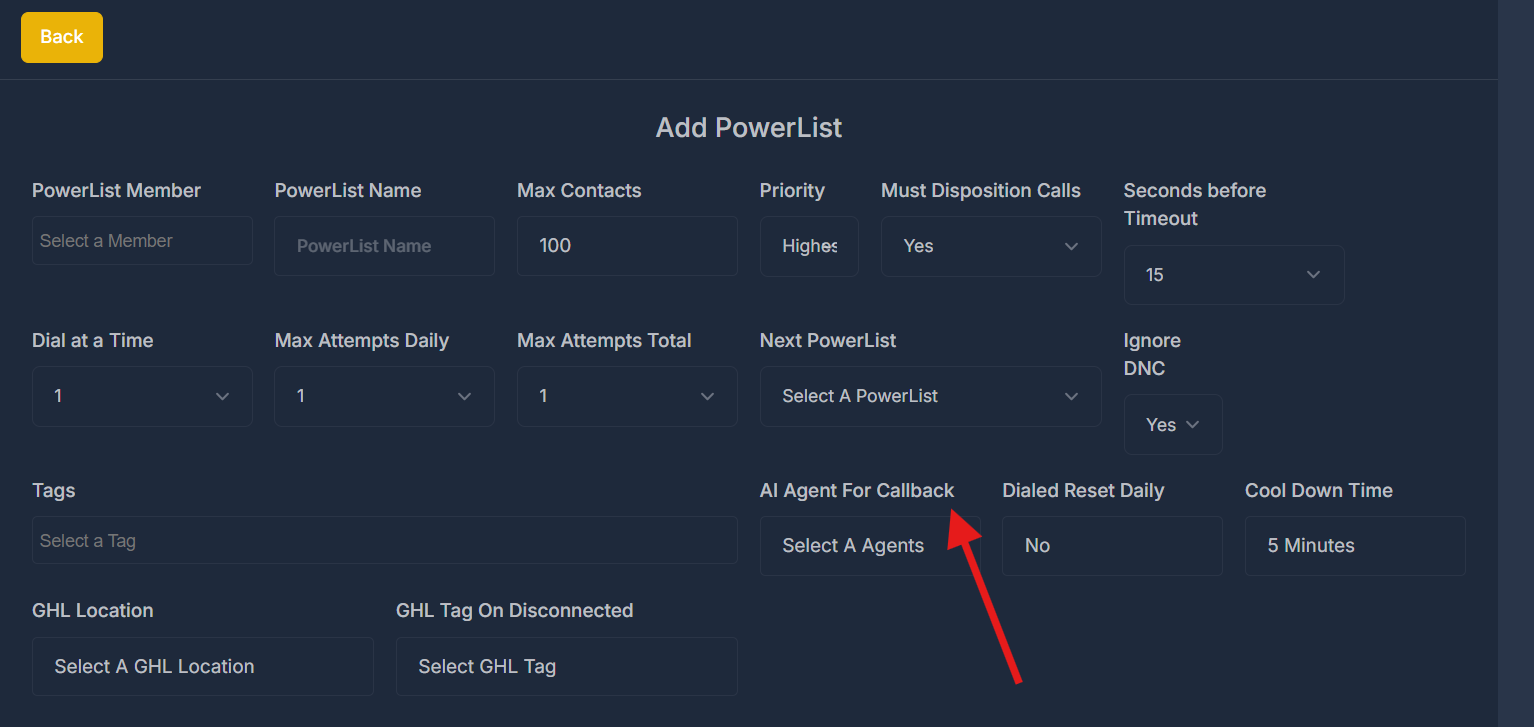
This allows dynamic customization of:
- 🤝 Tone & behavior
- 📜 Script logic
- 🎯 Lead type handling
AI agents act as backups for overflow or after-hours handling.
🔁 Callback Handling Logic#
If a contact picks up but drops (due to no human agent available) or misses the call:
That lead is automatically flagged for callback.
The PowerList-assigned AI agent will:
- Re-engage the lead via automated callback
- Attempt to qualify, reschedule, or book appointment directly
🆕 What changed recently#
Campaigns
Predictive dialing for live human reps is available. Previously campaigns were for AI agents only. An admin can now pace a shared list across a floor of reps, and reps never pick their own line count.
Turning it on takes two deliberate steps and it will not run below two reps online. See Predictive pacing.
See What's New for the full history.