⚡ Trigger Hooks
Trigger Hooks provide a powerful automation framework that executes custom actions when specific events occur in your AI Sync system. Unlike webhooks that send data to external endpoints, trigger hooks perform internal actions and workflows within your AI Sync environment.
🔄 Trigger Hook Workflow#
Event Detection
System monitors for specified events (calls, agent actions, campaigns)
Condition Evaluation
Trigger conditions are evaluated against event data and context
Hook Execution
Qualifying events trigger the configured hook actions
Action Processing
Multiple actions can be executed sequentially or in parallel
Result Logging
Execution results and outcomes are logged for monitoring
📊 Trigger Hook vs Webhooks Comparison#
🔗 Webhooks vs ⚡ Trigger Hooks
| Feature | Webhooks | Trigger Hooks |
|---|---|---|
| Purpose | Send data to external systems | Execute internal actions |
| Direction | Outbound HTTP requests | Internal processing |
| Response | Depends on external endpoint | Immediate internal execution |
| Actions | Limited to HTTP calls | Multiple action types available |
| Latency | Network dependent | Minimal internal latency |
| Reliability | External system dependent | Internal system controlled |
| Use Cases | CRM integration, notifications | Automation, data processing, workflows |
📋 Trigger Hook Management#
Navigate to Setup > Trigger Hooks to manage your automation configurations.
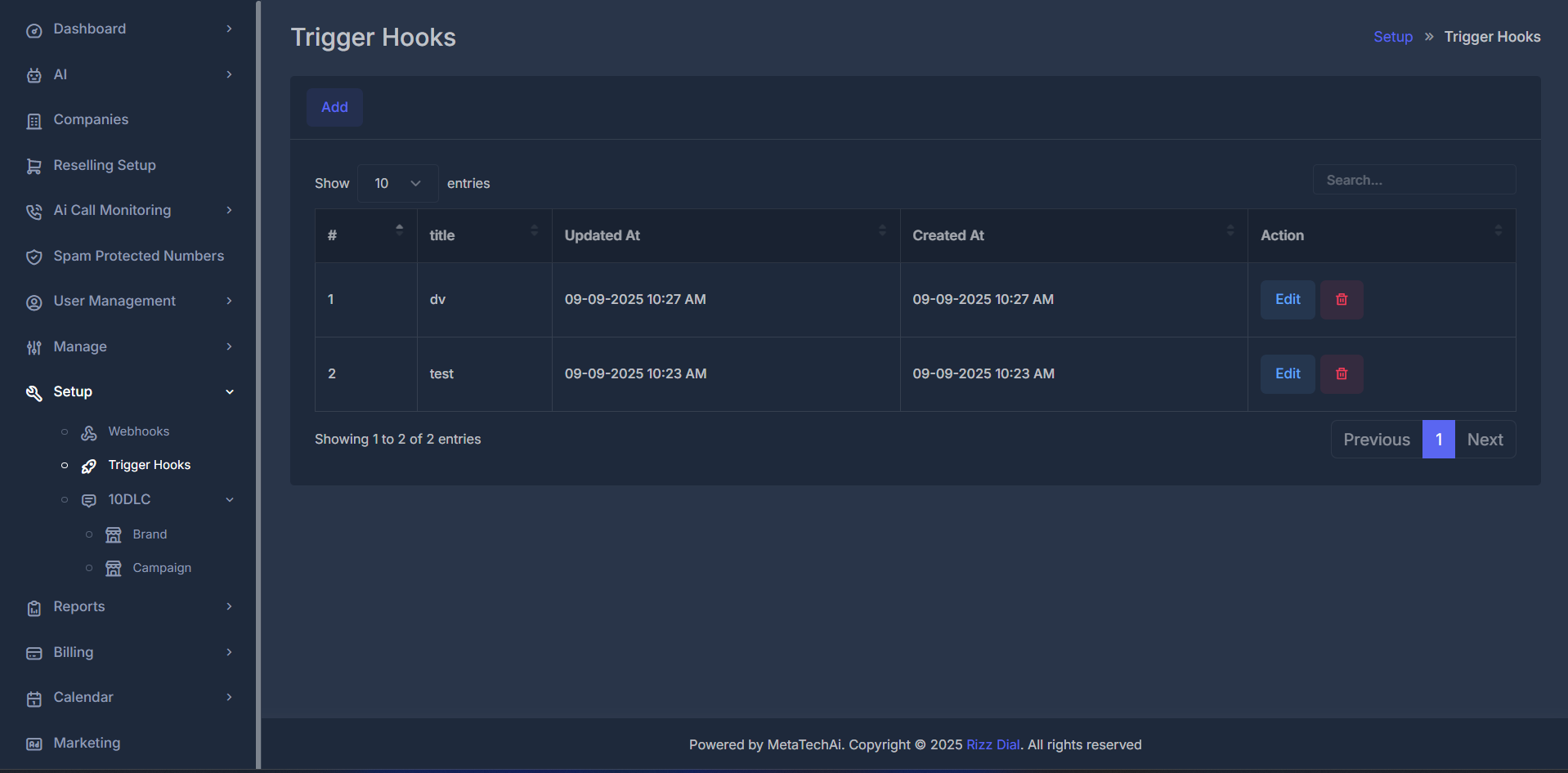
📑 Trigger Hook Table Overview#
| Column | Description | Example |
|---|---|---|
| # | Sequential hook ID | 1, 2, 3 |
| Title | Hook name/identifier | Lead Qualification, Follow-up Scheduler |
| Updated At | Last modification timestamp | 09-09-2025 10:27 AM |
| Created At | Hook creation timestamp | 09-09-2025 10:23 AM |
| Action | Management options | Edit, Delete, Duplicate, Test |
⚡ Quick Actions#
Add New Hook
Create new trigger hooks for your automation needs
Edit Configuration
Modify existing hook settings and conditions
🎛️ Trigger Hook Configuration#
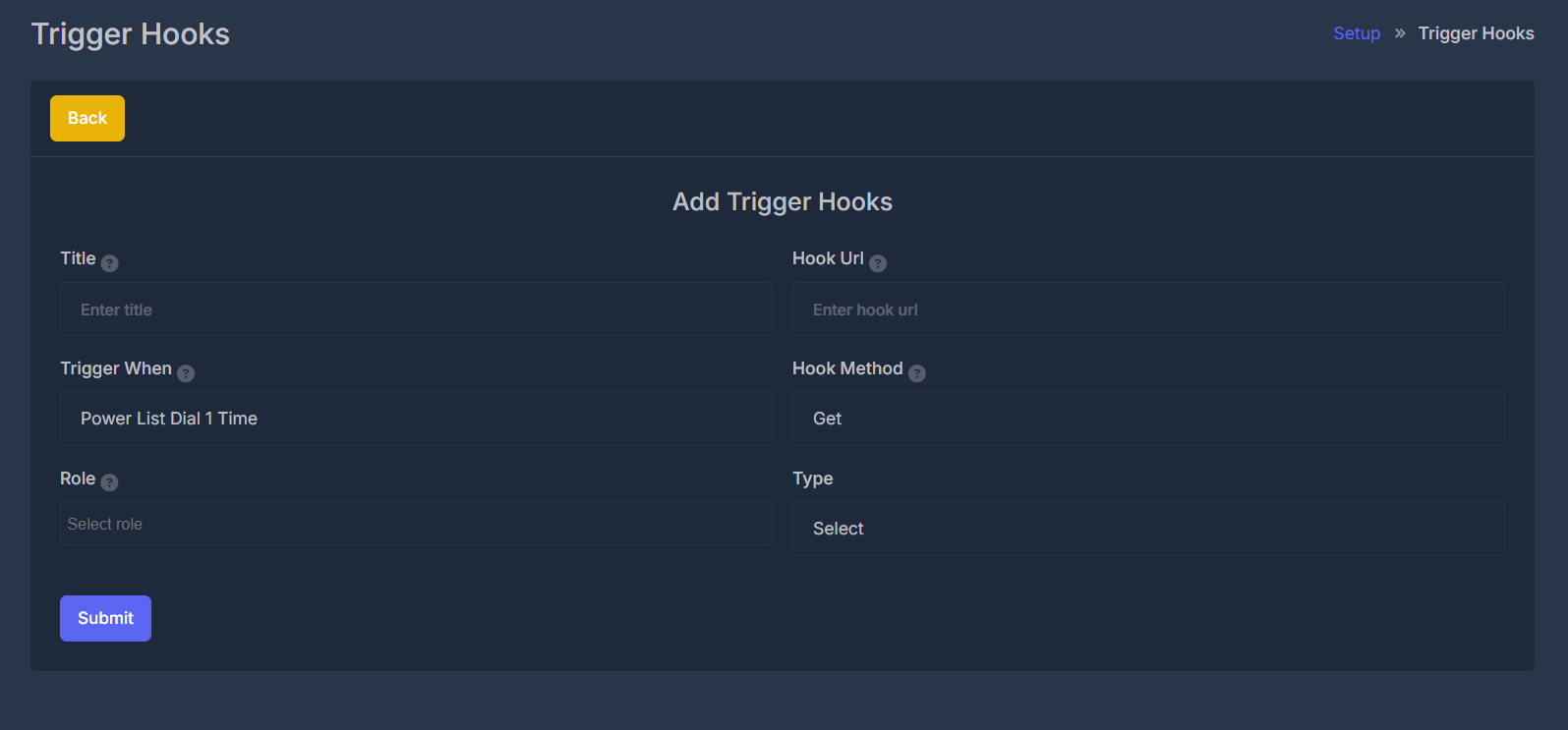
🆕 Creating a New Trigger Hook#
Access Trigger Hooks
Navigate to Setup > Trigger Hooks and click "Add"
Basic Information
- Title: Descriptive name for the trigger hook
- Description: Optional detailed description of the hook's purpose
- Status: Enable/disable the hook
Trigger Configuration
- Trigger When: Select the event type that activates the hook
- Conditions: Set up conditional logic for when the hook should execute
- Filters: Apply additional filters based on data attributes
Action Configuration
- Hook URL: Internal or external endpoint to call
- Hook Method: HTTP method (GET, POST, PUT, DELETE)
- Type: Define the hook type and processing method
- Role: Specify user role requirements for execution
Test and Activate
Test the trigger hook with sample data and activate for live events
🏷️ Field Definitions#
📝 Basic Fields
Title
- Purpose: Human-readable identifier for the trigger hook
- Format: Text string (max 255 characters)
- Example: "Lead Qualification Hook", "Follow-up Scheduler"
Description
- Purpose: Detailed explanation of hook functionality
- Format: Text area (optional)
- Example: "Automatically qualifies leads based on call sentiment and duration"
⚡ Trigger Configuration
Trigger When
- Purpose: Defines the event that activates the hook
- Options:
Power List Dial 1 Time- After first dial attemptPower List Dial 2 Times- After second dial attemptPower List Dial 3 Times- After third dial attemptCall Ended- When any call completesCall Answered- When call is answeredAgent Response- When AI agent respondsLead Generated- When new lead is createdAppointment Scheduled- When appointment is bookedSMS Sent/Received- SMS eventsCampaign Started/Ended- Campaign lifecycle events
Conditions
- Purpose: Additional logic to filter when hook executes
- Format: Conditional expressions
- Examples:
call_duration > 60(calls longer than 1 minute)sentiment == "positive"(positive sentiment only)lead_score >= 80(high-quality leads only)
🔗 Hook Configuration
Hook URL
- Purpose: Endpoint URL to send hook data
- Format: Valid HTTP/HTTPS URL
- Examples:
https://api.yourcrm.com/webhook/leadshttps://app.hookk.com/webhookhttps://internal.ai-sync.com/process-lead
Hook Method
- Purpose: HTTP method for the hook request
- Options:
GET,POST,PUT,DELETE,PATCH - Default:
POST - Usage: POST for creating data, PUT for updates, GET for queries
Type
- Purpose: Categorizes the hook for processing and organization
- Options:
Lead Processing- Lead qualification and routingCRM Integration- Customer relationship managementAnalytics- Data analysis and reportingNotification- Alerts and notificationsWorkflow- Business process automationOther- Custom or miscellaneous hooks
👤 Role & Security
Role
- Purpose: Defines which user roles can trigger this hook
- Options:
Agent- AI agents can trigger the hookAdmin- Administrator users onlyManager- Manager level and aboveUser- Any authenticated userSystem- System-level automated triggers
- Security: Ensures proper access control for sensitive operations
📝 Edit Trigger Hook#
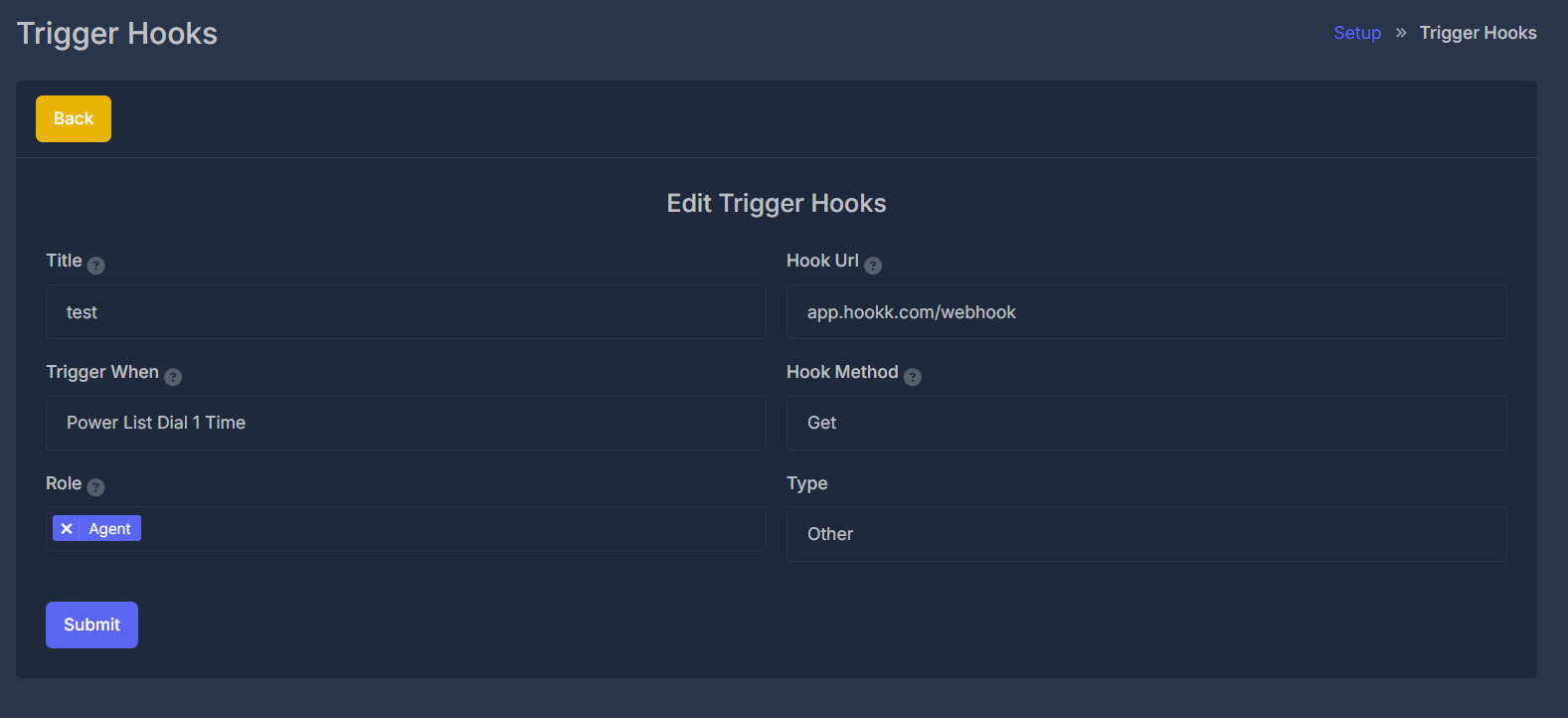
When editing existing trigger hooks, you can modify all configuration parameters while maintaining execution history and performance metrics.
🎪 Available Trigger Events#
Call Events
Triggers:
Call Started/Ended/AnsweredPower List Dial AttemptsCall Transferred
Use Cases:
- Real-time monitoring
- Progressive lead nurturing
- CRM updates
Data: Call status, duration, participant info, recordings
Agent Events
Triggers:
Agent Response GeneratedEscalation RequiredPerformance Threshold
Use Cases:
- Quality monitoring
- Performance optimization
- Training triggers
Data: Agent metrics, response content, conversation context
Lead Events
Triggers:
Lead Generated/QualifiedStatus/Score Changed
Use Cases:
- CRM synchronization
- Lead routing
- Sales notifications
Data: Demographics, qualification scores, interaction history
Campaign Events
Triggers:
Campaign Started/CompletedMilestone ReachedPerformance Alert
Use Cases:
- Performance monitoring
- Budget management
- Result processing
Data: Campaign metrics, progress, ROI statistics
Appointment Events
Triggers:
Scheduled/Confirmed/CancelledRescheduled
Use Cases:
- Calendar integration
- Reminder automation
- No-show prevention
Data: Appointment details, participant info, availability
Follow-up Events
Triggers:
Follow-up DueTask CreatedDeadline Approaching
Use Cases:
- Task automation
- Deadline management
- Customer retention
Data: Task details, assigned members, due dates