🎓 Available Courses
Welcome to the Knowledge Hub - your gateway to comprehensive learning and skill development!
Discover a curated collection of courses designed to help you master the platform and enhance your professional skills. Whether you're just getting started or looking to advance your expertise, we have the perfect learning path for you.
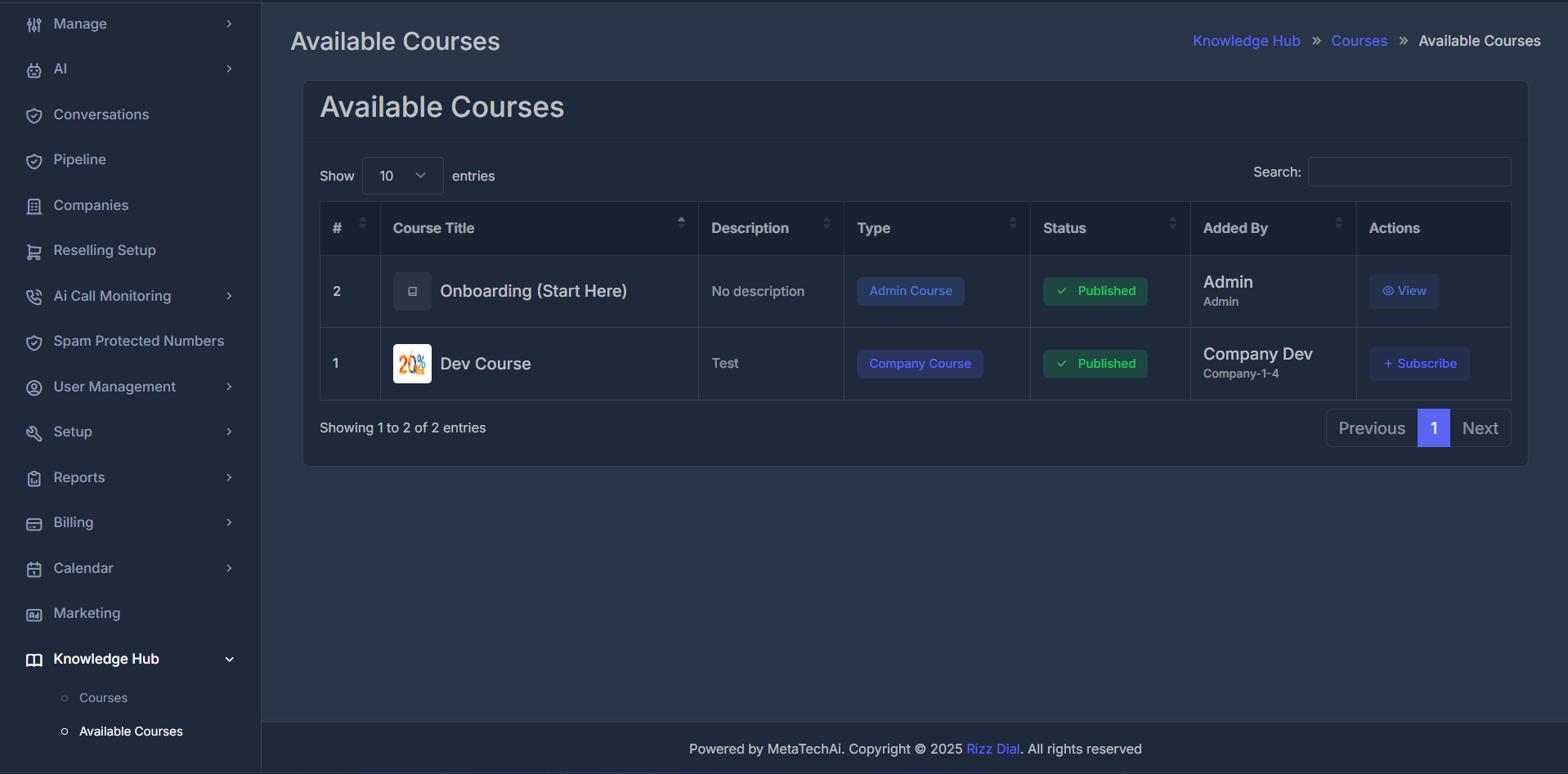
💡 Quick Tip: Start with the "Onboarding (Start Here)" course to get familiar with the platform, then explore specialized courses based on your role and interests.
📖 Course Catalog#
Browse through our comprehensive collection of courses, each designed to help you succeed. Filter by type, search by keywords, or explore based on your learning goals.
🚀 Onboarding (Start Here)#
Perfect for: New users and platform beginners
Duration: Self-paced (approximately 2-3 hours)
Difficulty: Beginner
Certificate: Available upon completion
| Course Details | Information |
|---|---|
| Course Type | Admin Course |
| Status | Published |
| Added By | Admin |
| Enrollment | Available for all users |
| Description | Complete onboarding course to get you started with the platform |
📋 Course Overview#
This comprehensive onboarding course will guide you through the essential steps to set up and activate your account. The course covers everything from initial login to advanced configuration, ensuring you're fully prepared to use all platform features.
🏗️ Course Structure#
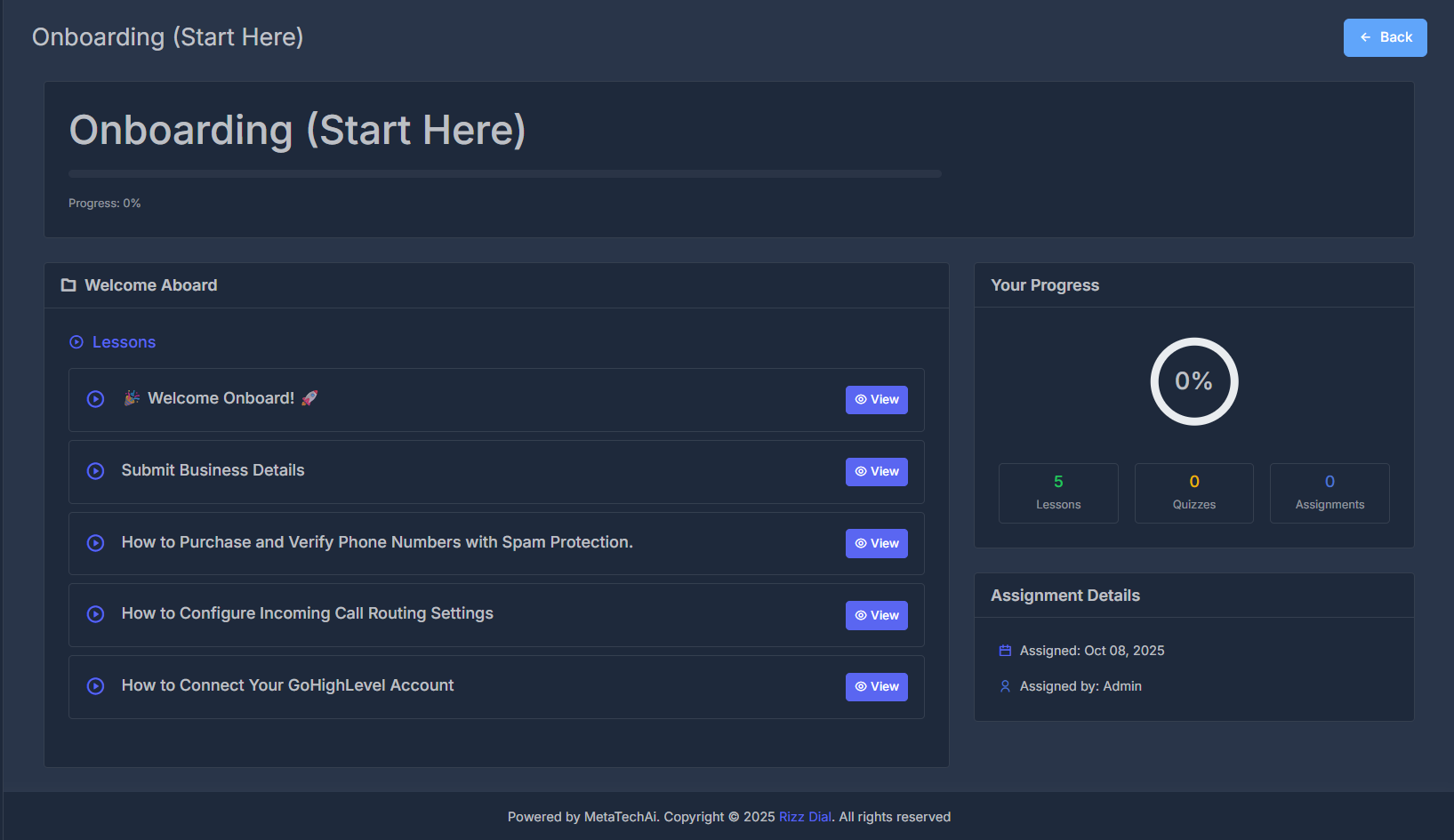
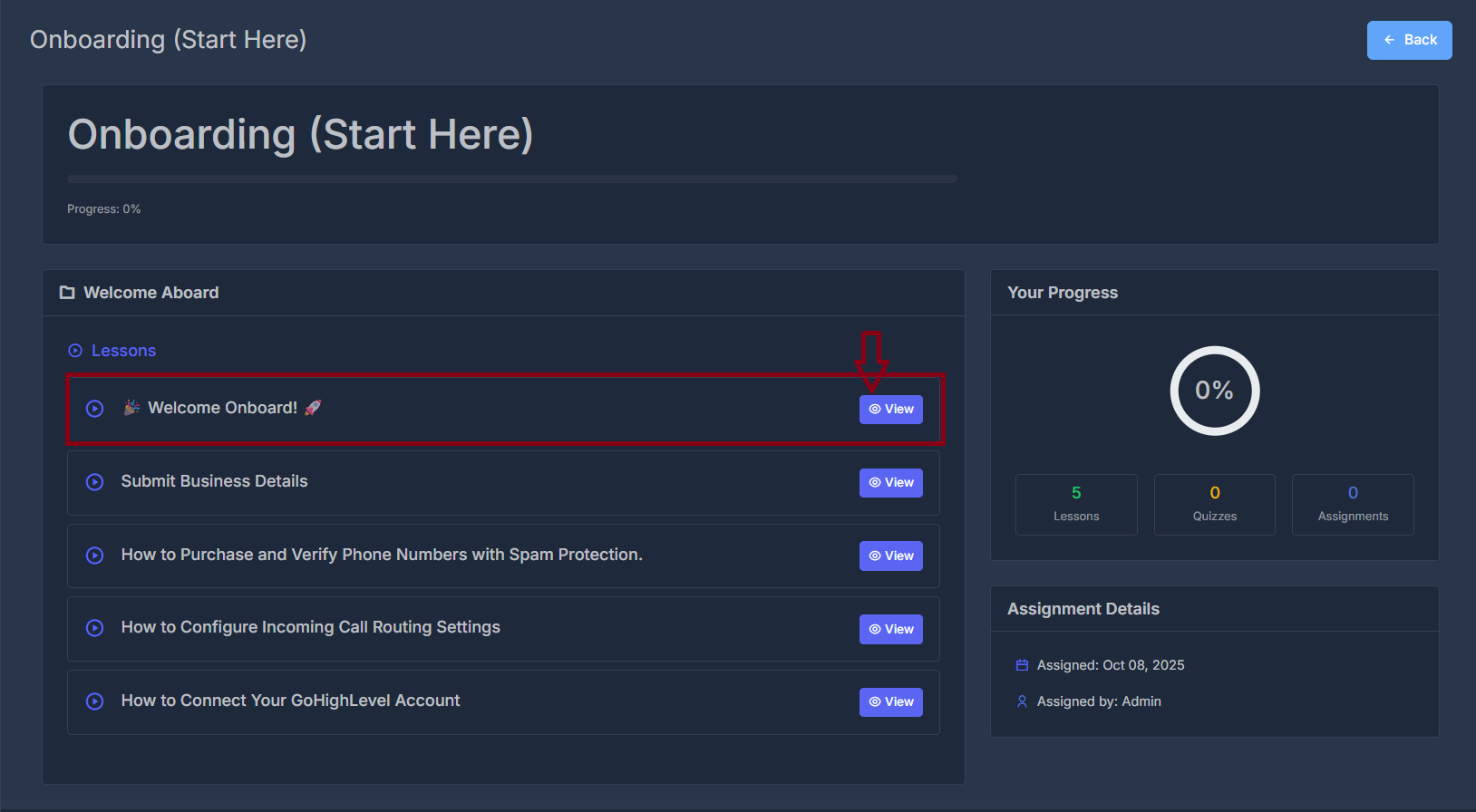
- Total Lessons: 5
- Quizzes: 0
- Assignments: 0
- Progress Tracking: Available
📝 Lessons Included#
-
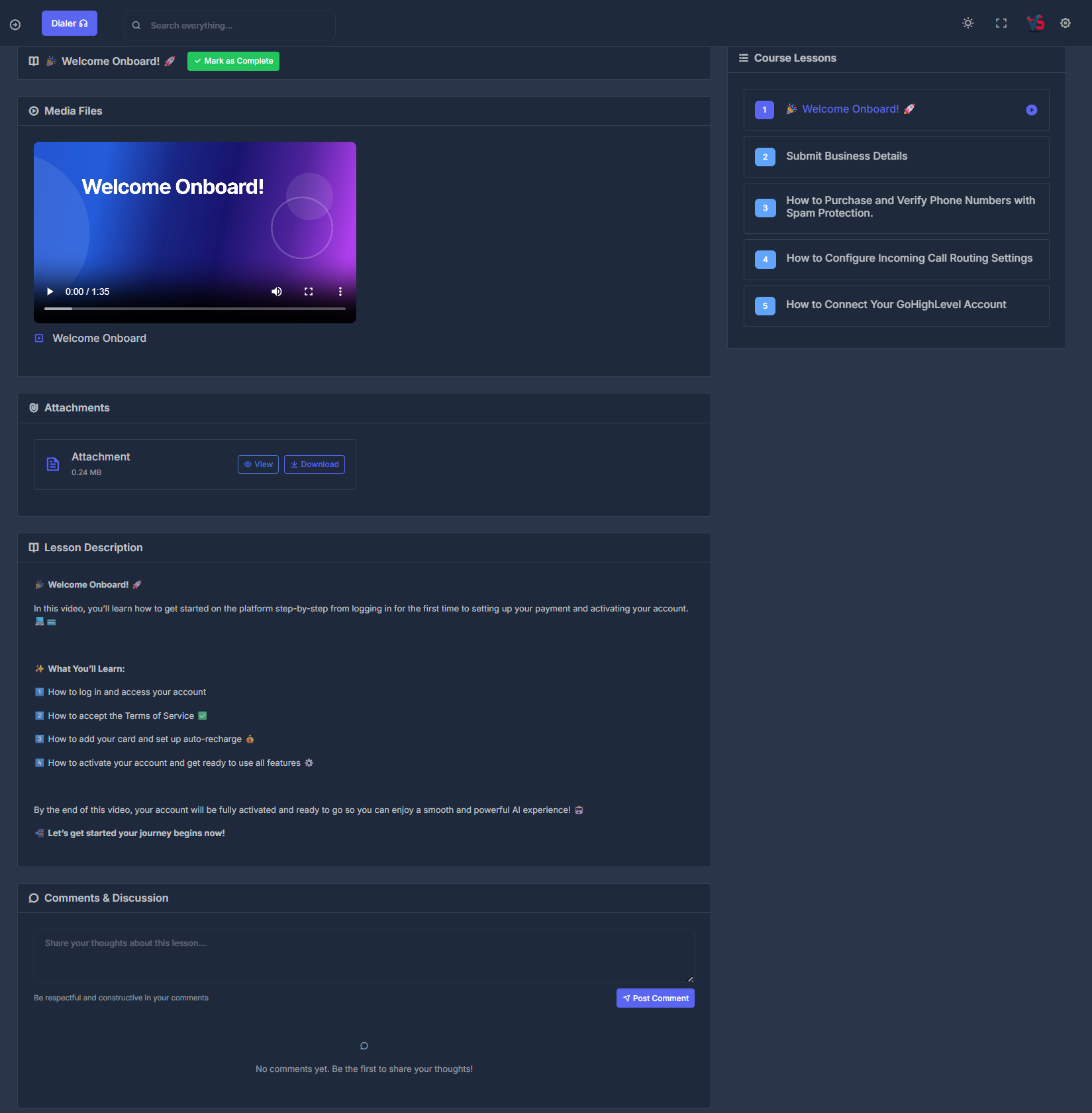
Welcome Onboard!
- Learn how to get started on the platform step-by-step
- From logging in for the first time to setting up your payment
- Activate your account and get ready to use all features
-
Submit Business Details
- Complete your business profile setup
- Configure essential business information
-
How to Purchase and Verify Phone Numbers with Spam Protection
- Learn the phone number purchasing process
- Understand spam protection features
- Set up verification procedures
-
How to Configure Incoming Call Routing Settings
- Master call routing configuration
- Set up proper call handling workflows
-
How to Connect Your GoHighLevel Account
- Integrate with GoHighLevel platform
- Configure external system connections
🎯 What You'll Learn#
- ✅ Account Access: How to log in and access your account
- ✅ Terms & Service: How to accept the Terms of Service
- 💰 Payment Setup: How to add your card and set up auto-recharge
- ⚙️ Account Activation: How to activate your account and get ready to use all features
🏆 Course Benefits#
By the end of this course, your account will be fully activated and ready to go so you can enjoy a smooth and powerful AI experience!
Let's get started - your journey begins now! 🤖
👨💻 Dev Course#
Perfect for: Developers and technical team members
Duration: Self-paced (variable based on content)
Difficulty: Intermediate to Advanced
Certificate: Available upon completion
| Course Details | Information |
|---|---|
| Course Type | Company Course |
| Status | Published |
| Added By | Company Dev (Company-1-4) |
| Course ID | #1 |
| Enrollment | Available for company members |
| Description | Test course for development purposes |
📋 Course Overview#
This is a development course designed for testing and training purposes within the company environment. It provides hands-on experience with development tools and processes, helping you master the technical aspects of the platform.
💡 Course Features#
- Development-focused content and practical exercises
- Company-specific training materials and guidelines
- Testing and evaluation tools for skill assessment
- Real-world project scenarios for hands-on learning
- Code review and collaboration practices
🏗️ Course Structure#
- Total Lessons: Variable (based on development needs)
- Quizzes: Available
- Assignments: Practical coding exercises
- Progress Tracking: Real-time monitoring
📝 How to Enroll#
Ready to start your learning journey? Follow these simple steps to enroll in any available course:
1️⃣ Step 1: Browse Available Courses#
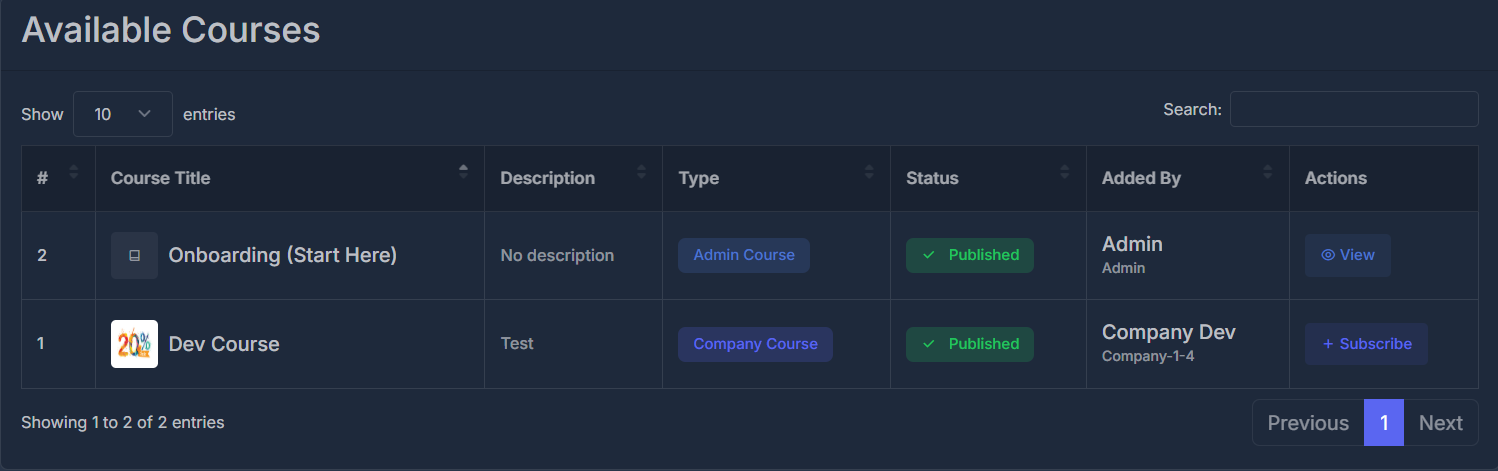
Review the course catalog above to see all available courses. Each course shows:
- Course title and description
- Course type (Admin or Company)
- Publication status
- Who added the course
- Available actions
2️⃣ Step 2: Select a Course#
- Click on the course title to view detailed information
- Use the "View" button to access course content
- Review course requirements and prerequisites
3️⃣ Step 3: Enroll in the Course#
- Click "Subscribe" for Company courses
- Click "View" for Admin courses
- Confirm your enrollment when prompted
4️⃣ Step 4: Track Your Progress#
- Monitor your completion status in real-time
- View lesson progress and completion percentages
- Access course materials and resources
🏷️ Course Types#
Understanding the different course types helps you choose the right learning path for your needs:
🛡️ Admin Course#
- Availability: System-wide courses available to all users
- Content: General platform training and onboarding
- Access: No special permissions required
- Examples: Onboarding, platform basics, general training
🏢 Company Course#
- Availability: Organization-specific courses for team members
- Content: Company-specific processes and procedures
- Access: Requires company membership
- Examples: Development training, company policies, specialized workflows
📑 Course Status#
Courses can have different publication statuses:
- Published: Course is live and available for enrollment
- Draft: Course is being developed and not yet available
- Archived: Course is no longer active but may be accessible for reference
🛠️ Getting Started#
Follow this step-by-step guide to begin your learning journey:
1️⃣ Access the Knowledge Hub#
- Navigate to the Knowledge Hub from the main menu
- Look for the "Knowledge Hub" section in the sidebar
- Click to expand the menu options
2️⃣ View Available Courses#
- Select "Available Courses" from the Knowledge Hub menu
- Browse through the course catalog
- Use search and filter options to find specific courses
3️⃣ Choose Your Course#
- Review course descriptions and requirements
- Check course type and availability
- Select a course that matches your learning needs
4️⃣ Begin Learning#
- Click "Subscribe" for Company courses
- Click "View" for Admin courses
- Start with the first lesson and track your progress
✨ Course Features#
The learning platform offers several features to enhance your educational experience:
📈 Progress Tracking#
- Real-time progress monitoring
- Completion percentages for each lesson
- Overall course progress indicators
- Achievement badges and milestones
🖥️ Interactive Content#
- Video lessons with playback controls
- Downloadable attachments and resources
- Interactive quizzes and assessments
- Discussion forums for each lesson
📱 Mobile Access#
- Responsive design for mobile devices
- Offline access to downloaded content
- Synchronized progress across devices
- Push notifications for course updates