When a rep emails a lead from the dialer, the Inbox or an automation, the lead should see a real person at your company, not a platform address. Set up your domain once and every email goes out like this:
Maria Gomez <maria@harbordental.com>
and when the lead replies, it lands in Maria's own inbox.
✅ Before you start#
- You're the account owner in AI Sync.
- You can sign in to wherever your domain is managed: GoDaddy, Cloudflare, Namecheap, Google, Squarespace or similar. If someone else manages it, send them the three records from step 2.
- Your domain is a business domain. Gmail, Yahoo, Outlook and other free addresses can't be used.
🧭 Set it up#
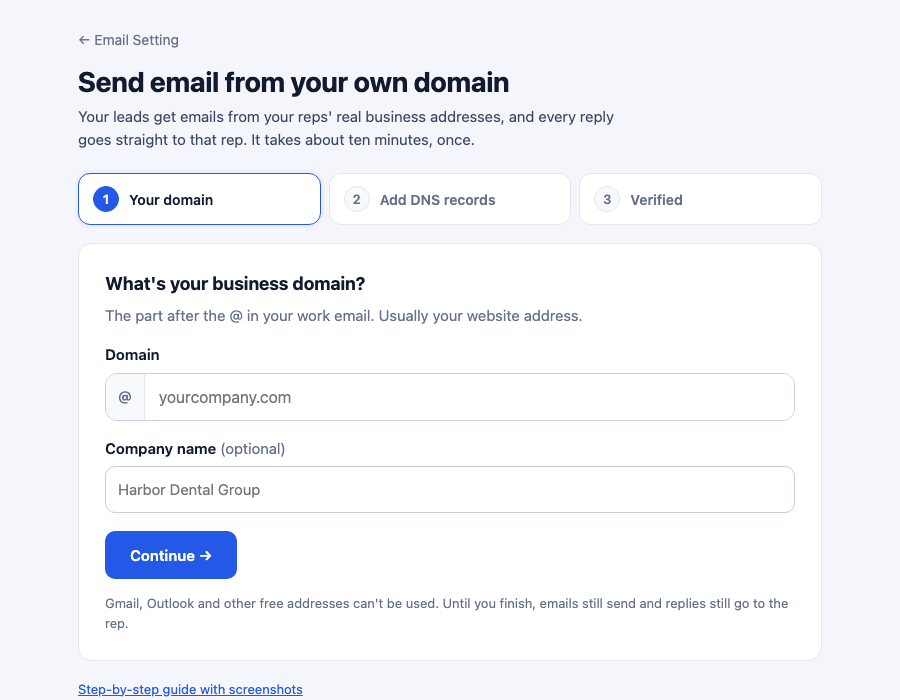
Enter your domain
Go to Settings → Email Setting and click Set up your domain on the
Send from your own domain card. Type your domain, like harbordental.com,
and click Continue →.
Add the three records to your DNS
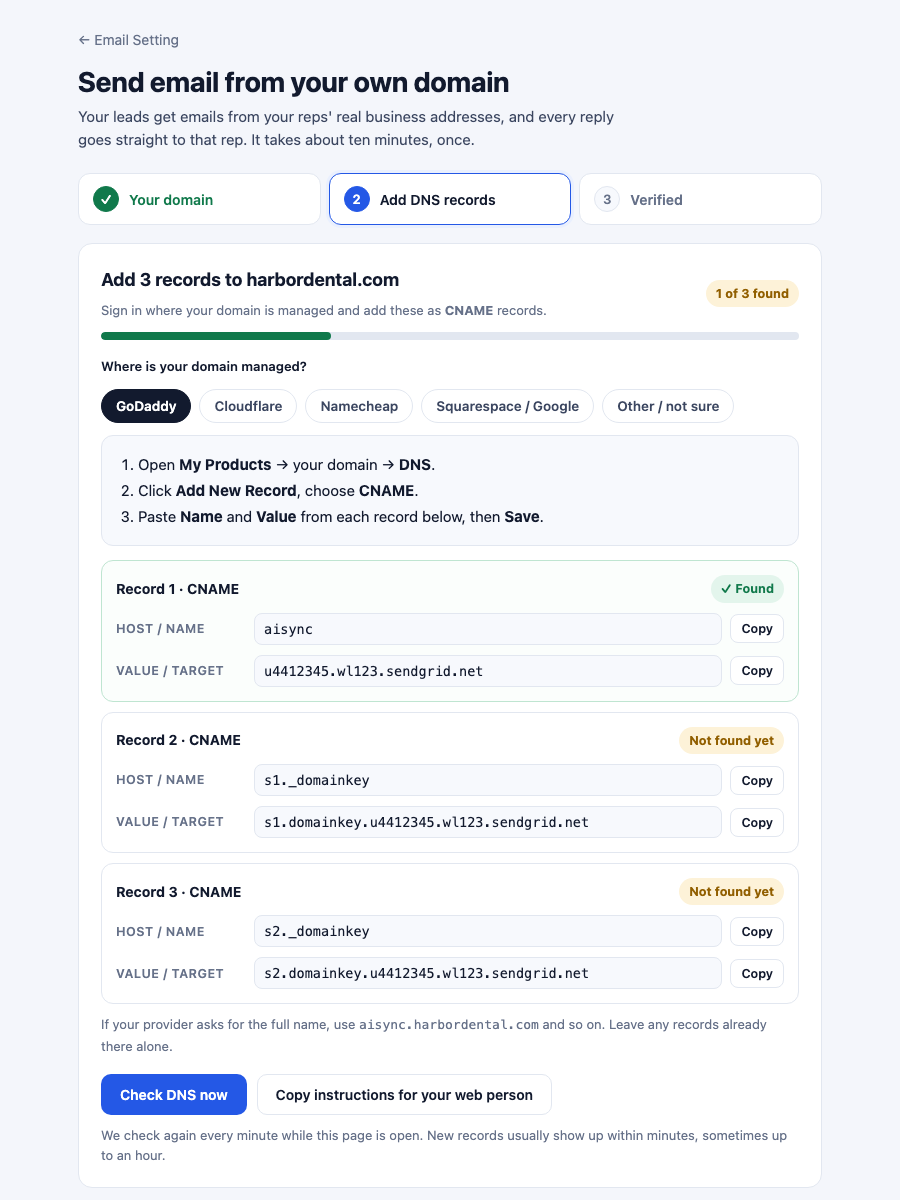
AI Sync shows three CNAME records. Pick where your domain is managed and the page shows exactly where to click there. Add each record with the Copy buttons so nothing is mistyped.
Someone else runs your website? Click Copy instructions for your web person and paste it into an email to them.
| Provider | Where | Host / Name field | Value field | Watch out |
|---|---|---|---|---|
| GoDaddy | My Products → domain → DNS → Add New Record | Name: aisync | Value | |
| Cloudflare | domain → DNS → Records → Add record | Name: aisync | Target | Set Proxy status to DNS only (grey cloud) |
| Namecheap | Domain List → Manage → Advanced DNS | Host: aisync | Value | Click the green ✓ to save |
| Squarespace / Google | Domains → domain → DNS | Host: aisync | Data | |
| Other | DNS settings where the domain is registered or hosted | The short name | The value | If it asks for the full name, use aisync.yourdomain.com |
The table shows record 1. Records 2 and 3 work the same way with
s1._domainkey and s2._domainkey. Don't change or delete any records that
are already there.
Click Check DNS
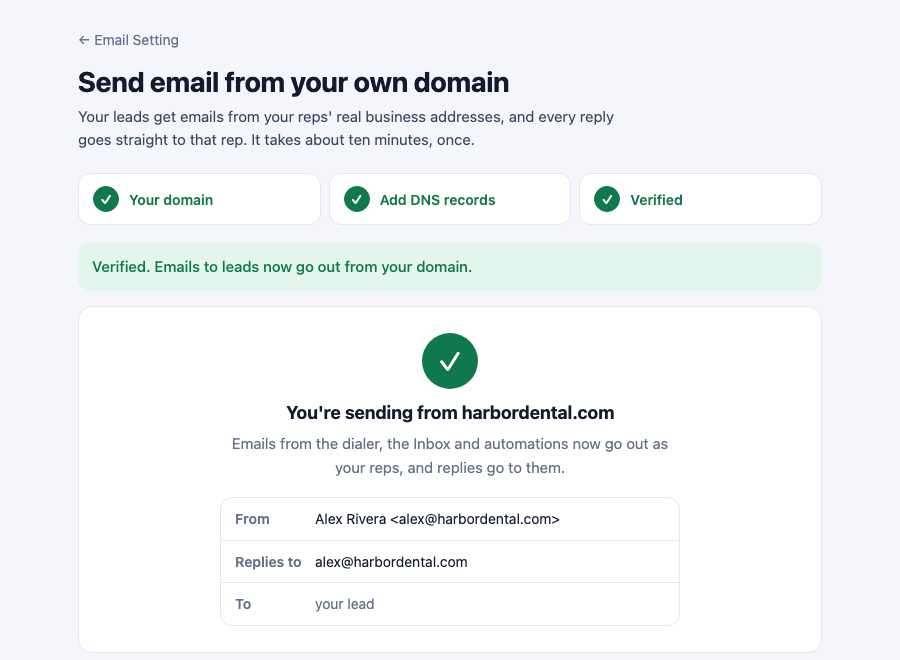
Click Check DNS now. Leave the page open and it checks again every minute by itself. New records usually show up within a few minutes, sometimes up to an hour. When all three say ✓ Found, you land on Verified, with a preview of exactly what your leads will see.
Check who emails come from
Under Who emails come from, set the company address (for example hello)
and your company name. Click Save.
🤖 Or let your AI assistant do it#
With Claude, ChatGPT or Codex connected to AI Sync (see Connect MCP), paste this:
Set up my business email domain in AI Sync so emails to leads go out from my
own domain. Use my AI Sync connection: look up the email domain setup, add my
domain if it isn't there yet, and show me the three DNS records in a simple
table with exactly what to type for my DNS provider. If you can reach my DNS
provider, add them for me (Cloudflare: proxy off). Then check DNS until it's
verified, and tell me in one line when it's done.
The same prompt is on the setup page, with a Copy prompt button.
- Your assistant can reach your DNS (for example Cloudflare's own connector): it adds the records itself, and you just approve.
- It can't: it gives you a table of exactly what to type, then checks for you.
For people building agents: the tools
| Tool | What it does |
|---|---|
email_domain_get | Status (not_set_up, pending, verified), the 3 records and a plain next_step |
email_domain_setup | Add the domain; returns the records. Safe to repeat. |
email_domain_check | Check DNS now. Wait a minute between checks. |
email_domain_sender | Set the company address (e.g. hello) and name |
email_domain_remove | Remove it. Confirm with the user first. |
Each record has host (full name) and host_short (what most providers
want). Only the account owner can use these. The API behind them is
/api/settings/email-domain.
✉️ Who each email comes from#
| The rep's AI Sync login | Email goes out as | Replies go to |
|---|---|---|
| On your domain, e.g. maria@harbordental.com | Maria Gomez <maria@harbordental.com> | Maria |
| Somewhere else, e.g. sam@gmail.com | Sam Patel <hello@harbordental.com> | Sam's own address |
| No rep involved | The account owner, the same way | The account owner |
This covers the dialer's Email tab, the Inbox and Send Email steps in automations and workflows. For automations, "the rep" is whoever saved the disposition.
Before your domain is verified, emails still send, from the AI Sync address, and replies still go to the rep. Nothing breaks while you wait for DNS.
Already using your own SendGrid account under Email Setting? That keeps working exactly as before. A workflow step that names its own From address also keeps it.
📋 SOP: onboarding a client#
- ☐ Client's account owner is signed in to AI Sync.
- ☐ Settings → Email Setting → Set up your domain, enter the domain.
- ☐ The three CNAME records are added in the client's DNS (by them, or whoever runs their website).
- ☐ Check DNS shows Verified.
- ☐ Company address and name saved under Who emails come from.
- ☐ Test: from the dialer, email a contact with your own email address. It arrives from the rep's address, and replying goes to the rep.
- ☐ Tell reps: "Your emails now go out from your work address, and replies come to you."
🧯 If something is off#
Records still "Not found yet" after an hour
Check each record's Host in your provider. The most common mistake is the
domain added twice, like aisync.harbordental.com.harbordental.com: enter
only the short name. On Cloudflare, the proxy must be off (grey cloud,
"DNS only").
"Use your business domain"
Free addresses like Gmail or Outlook can't be set up. Use the domain your business email and website are on.
"That domain is already set up on another AI Sync account"
Another account already added it. Contact support to move it.
A rep's emails come from hello@ instead of their name@
Their AI Sync login email isn't on your domain. Change their login email to their work address in User Management, or leave it: replies still go to them.
Emails land in spam
Make sure all three records say ✓ Found. Keep emails personal and short; long promotional emails to people who didn't ask for them get filtered whatever the setup.
Switching back
Click Remove domain. Emails go out from the AI Sync address again at once, with replies to the rep. You can delete the three records from your DNS afterwards.
Lead replies don't come into the dialer's Inbox yet. They go to the rep's own email inbox. See Inbox.