Agency Reseller is how an agency runs many client accounts from one login.
Each client gets their own workspace (numbers, reps, dialer, AI). You stay the parent account. You sell them a plan, finish their setup (or send them a link to finish it), and get paid on your own Stripe account.
The menu lives in the left sidebar as Agency Reseller. Only agency accounts see it.
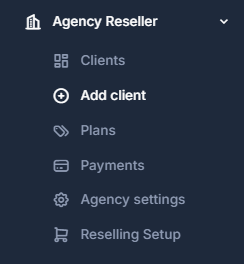
📋 What is in the menu#
| Item | What it is for |
|---|---|
| Clients | Every client at a glance: plan, setup progress, carrier, numbers, reps, and minutes. |
| Add client | Create the account, then walk a 6-step setup. You can finish it or invite the client. |
| Plans | Packages you sell: features, monthly price, and markup on calls, texts, numbers, and seats. |
| Payments | What clients paid you, what failed, and when Stripe sent it to your bank. Owner only. |
| Agency settings | Connect Stripe once. Optionally save your Twilio login so clients can run on it. Owner only. |
| Reselling Setup | The older pricing screen. Same plans, with per-rate markup. Use Plans for day-to-day work. |
💰 How the money works#
Two different things get charged, and they are not the same wallet.
| What | Who pays | Where it lands |
|---|---|---|
| The client's plan (and wallet top-ups they buy from you) | The client, on your Stripe | Your Stripe balance, then your bank |
| Usage on Our network (AI minutes, calls, texts, numbers) | You, from your agency usage balance | Platform billing. Turn on auto-recharge so it does not run dry |
| Usage on your Twilio or the client's Twilio | Twilio bills that account directly | We do not bill call, text, or number usage for those clients |
We do not take a cut of what clients pay you on Stripe.
A client cannot be created until you have at least one plan that includes features. An empty plan opens a blank account.
✅ Suggested order#
Make a plan
Open Plans and click New plan. Pick features, a monthly price, and a markup. Every new client needs one.
Connect Stripe
Open Agency settings and finish Stripe. Plans and wallet top-ups cannot reach your bank until it is active.
Add a client
Create the account, save business details, pick a phone carrier, then buy or import numbers.
Open the account
From Clients, click Open. You are now inside that client's workspace.