Complete AI agent management system with folder organization, comprehensive controls, and detailed monitoring.
Folder Management System#
Sidebar Navigation
- All Agents - View complete agent inventory across all folders
- Custom Folders - Organize agents by project, client, or purpose
- + Add - Create new folders with custom names
- Folder Actions - Edit and delete folders via context menu
 Creating Folders
- Click + Add to open folder creation dialog
- Enter folder name in text field
- Click Save to create new organizational folder
- Manage folder contents by moving agents between folders

Agent Dashboard#
Header Controls
- + Add Agent - Create new AI agents
- Search - Find agents by name or ID
- Show Entries - Display 10, 25, 50, or 100 agents per page
- Pagination - Navigate through large agent lists
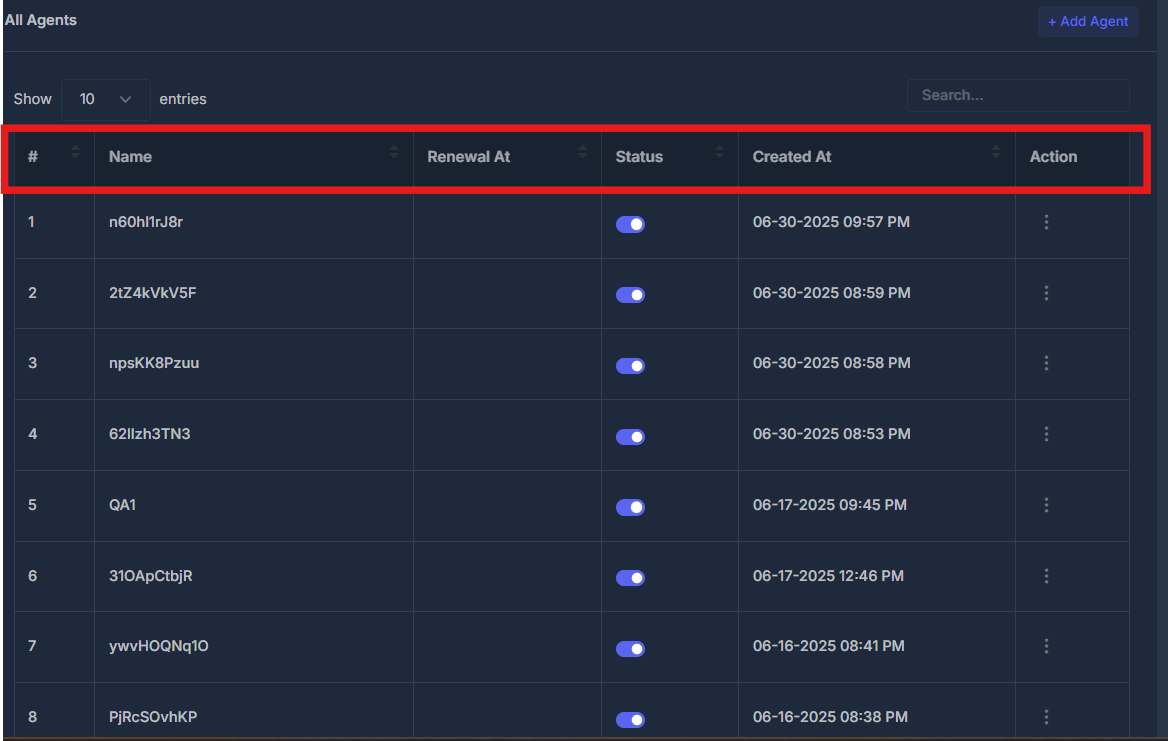
 Agent Table Overview
| Column | Description |
|---|---|
| # | Sequential agent number |
| Name | Agent identifier (e.g., n60hIfrJ8r, 2tZ4kVkV5F) |
| Renewal At | Subscription renewal dates |
| Status | Active/inactive toggle switches |
| Created At | Agent creation timestamps |
| Action | Management options menu |
Agent Actions Menu#
Primary Actions
- Edit - Basic agent configuration and settings
- Edit V2 - Advanced agent configuration options
- Test Call - Real-time agent performance testing
- AI Widget Configure - Customize agent interface widgets
- Endpoints - Manage API endpoints and integrations
Secondary Actions
- Duplicate - Clone existing agent configurations
- Delete - Remove agents (confirmation required)

Agent Status Management#
Status Controls
- Toggle Switches - Enable/disable agents instantly
- Bulk Operations - Manage multiple agents simultaneously
- Real-time Updates - Status changes reflect immediately

Search & Filtering#
Search Functionality
- Agent Name Search - Find agents by identifier
- Folder Filtering - View agents within specific folders
- Status Filtering - Filter by active/inactive status
- Date Range - Filter by creation or renewal dates
