Plans is where you build what you sell.
A plan is a package: a name, a monthly price (or bill-at-cost), a markup on usage, and the features the client can see. Every client must be on a plan that includes features.
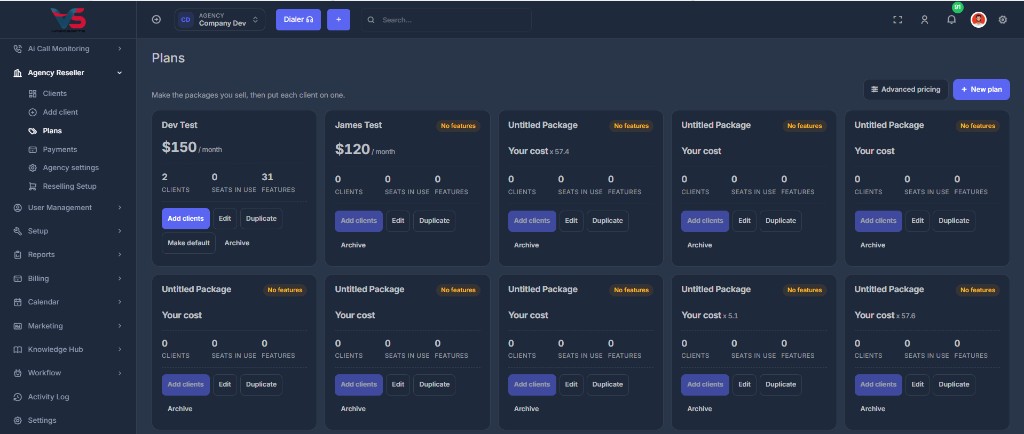
📋 What each card shows#
| On the card | Meaning |
|---|---|
| Name | What you and the client see |
| Price | Monthly amount, or Your cost if you checked bill-at-cost. A x 5.7 style figure is a multiplier from Advanced pricing |
| Clients | How many accounts are on this plan |
| Seats in use | Team seats currently used by those clients |
| Features | How many features are turned on |
From a card you can Add clients, Edit, Duplicate, Make default, or Archive.
➕ New plan#
Click New plan. You can start from a preset or build from scratch.
| Field | What to put |
|---|---|
| Plan name | Example: Growth |
| Monthly price | What you charge. Or check Bill at my cost (no fixed price) |
| One line your client sees | Optional description |
| Markup on calls, texts, numbers and seats | 0% means they pay your cost. Fine-tune a single rate under Advanced pricing |
| Features | Grouped checkboxes. Select all on a group if you want the whole set |
The right side of the editor is What your client sees: name, price, and the features you ticked.
A plan with zero features is not offered when you add a client. The account would open blank.
👥 Assign a plan#
Add clients on a card opens a picker. You see who is not already on that plan, and a preview of what changes. Confirm to move them.
You can also change one client's plan from the Plan dropdown on Clients.
📄 Duplicate, default, archive#
Duplicate copies the plan so you can tweak a variant without touching the original.
Make default marks the plan new clients should land on when you do not pick another one.
Archive stops the plan being offered for new clients. Anyone already on it stays on it and keeps everything.
⚙️ Advanced pricing#
Advanced pricing in the top right opens Reselling Setup, the older screen where you can set individual rates instead of one markup for everything.
Use Plans for day-to-day work. Use Advanced pricing when one rate should not follow the plan markup.
Only the agency owner can create, edit, assign, or archive plans.