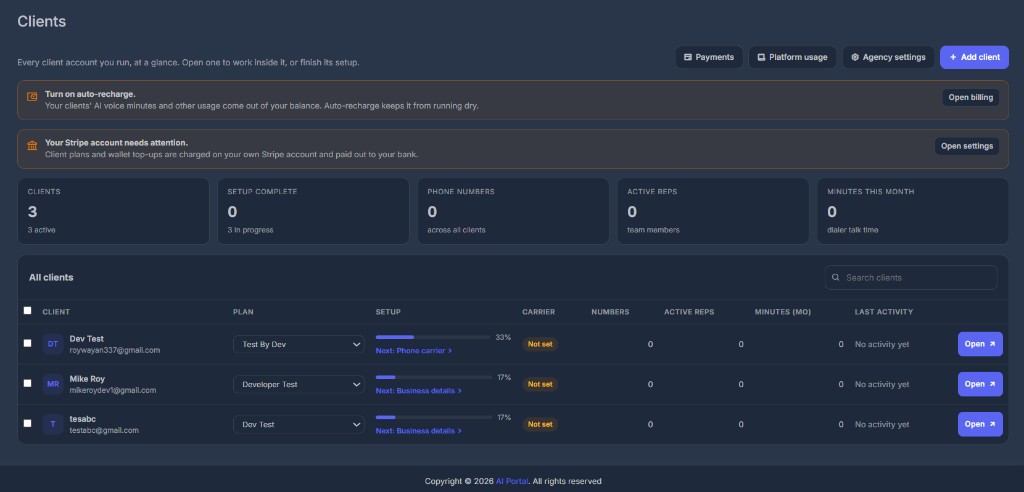
Clients is the Agency Reseller home page. You see every client account you run, how far setup has got, which phone carrier they are on, and whether they have been active.
🔔 Banners at the top#
Two warnings can appear above the tiles. They are for the agency owner.
Turn on auto-recharge. Your clients' AI voice minutes and other usage on Our network come out of your agency balance. Auto-recharge keeps it from running dry. Open billing goes to your subscription page.
Your Stripe account needs attention. Client plans and wallet top-ups are charged on your Stripe and paid out to your bank. Until Stripe is finished, those charges cannot land. Open settings goes to Agency settings.
Staff who are not the owner do not see the Stripe banner.
📊 Tiles#
| Tile | What it counts |
|---|---|
| Clients | How many client accounts you have, and how many are Active |
| Setup complete | How many finished all 6 setup steps, and how many are still in progress |
| Phone numbers | Numbers across every client |
| Active reps | Team members across every client |
| Minutes this month | Dialer talk time across every client |
📋 The table#
Search by name or email in the box on the right.
| Column | Meaning |
|---|---|
| Client | Business name and the sign-in email. Initials are taken from the name. |
| Plan | The plan this client is on. Owners can change it from the dropdown. |
| Setup | A percent bar. Done means all 6 steps are finished or skipped. If it is not done, Next: tells you which step is waiting. |
| Carrier | Our network, Your agency's Twilio, or The client's own Twilio. Not set until the Phone carrier step is saved. |
| Numbers | Phone numbers on that account |
| Active reps | Team members on that account |
| Minutes (mo) | Dialer talk time this month |
| Last activity | How long since something happened. No activity yet on a brand new account |
Open switches you into that client's workspace. See Open a client.
From the top of the page you can jump to Payments, Platform usage, Agency settings, or Add client.
➕ Empty state#
If you have no clients yet, the page asks you to add the first one. Create the account, pick its plan and phone carrier, then finish setup yourself or send the client a link.