Payments is owner-only.
This page is your Stripe, not the platform's. Plans and wallet top-ups your clients buy from you show up here. Usage on Our network does not: that is your agency billing page.
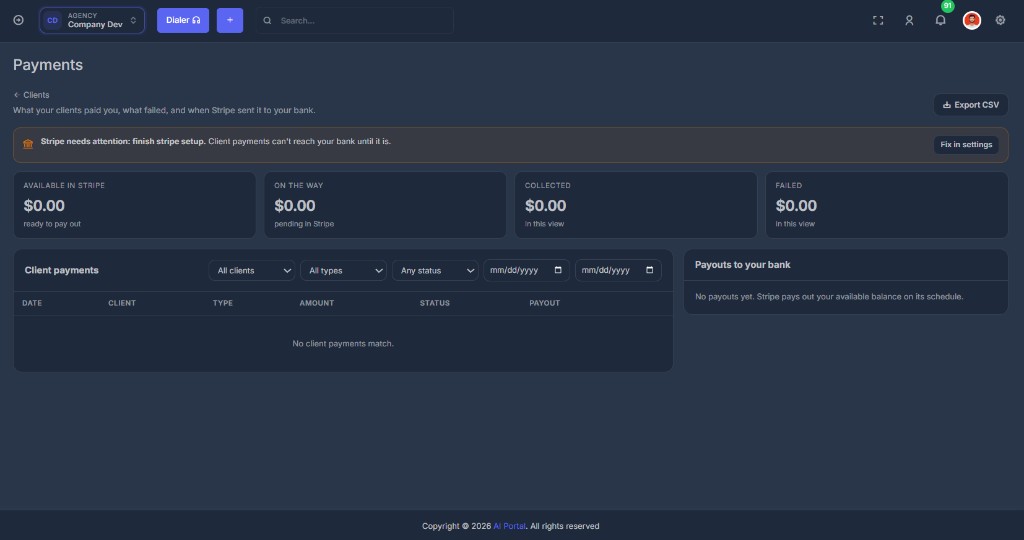
🔔 If Stripe is not finished#
A banner at the top:
Stripe needs attention: finish Stripe setup. Client payments cannot reach your bank until it is.
Fix in settings goes to Agency settings.
📊 Tiles#
| Tile | Meaning |
|---|---|
| Available in Stripe | Ready to pay out to your bank |
| On the way | Pending in Stripe (not in your bank yet) |
| Collected | Paid charges in the current filter |
| Failed | Failed charges in the current filter |
📋 Client payments#
Filter by client, type, status (Paid / Failed), and date range.
| Column | Meaning |
|---|---|
| Date | When the charge was attempted |
| Client | Which account paid |
| Type | Plan, seat, wallet top-up, and similar |
| Amount | What was charged |
| Status | Paid or Failed. Failed rows show Stripe's reason |
| Payout | Which payout the money is in, when Stripe has assigned one |
| Receipt | Opens the Stripe receipt when there is one |
Export CSV downloads the same filtered list.
🏦 Payouts to your bank#
The right-hand card is Stripe's payout schedule to the bank account on file (name and last four).
If the list is empty: Stripe pays out your available balance on its schedule. Connecting Stripe today does not create a payout until there is money to send.