Add client opens the wizard. Create the account first. Everything after that can be finished by you or by your client.
The left rail is the same 6 steps the whole way through.
| # | Step | Required? | What it is for |
|---|---|---|---|
| 1 | Business | Yes | Name, contact, time zone, address, plan, who pays |
| 2 | Business details | Yes | Legal name, EIN, industry. Carriers need this to register texting |
| 3 | Phone carrier | Yes | The network calls and texts go through |
| 4 | Phone numbers | Yes | Buy or import the numbers the team calls from |
| 5 | Team | Optional | Reps and managers who will use the account |
| 6 | GoHighLevel | Optional | Sync contacts and appointments |
After step 1 you also get Invite client to finish and Open account at the top.
You can keep working on a client after you send the invite. The link does not lock you out.
1️⃣ Business#
The client's company and the person you work with. They sign in with this email.
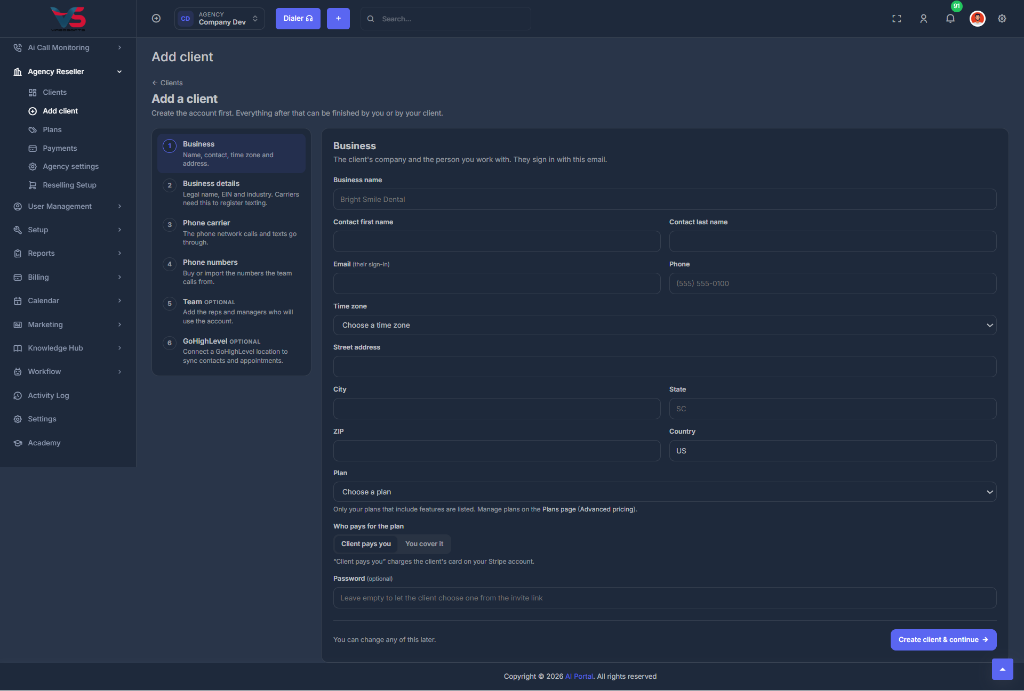
| Field | Notes |
|---|---|
| Business name | The account name. Example: Bright Smile Dental |
| Contact first / last name | The person you work with |
| Their sign-in. Must be unique | |
| Phone | Optional |
| Time zone | Used for their calendar and dialer hours |
| Street, city, state, ZIP, country | Defaults to US |
| Plan | Only plans that include features are listed |
| Who pays for the plan | Client pays you charges their card on your Stripe. You cover it means you eat the cost |
| Password | Optional. Leave empty and they choose one from the invite link |
Create a plan first. Every client needs a plan that includes features, or their account opens blank.
Create client & continue saves the account and unlocks the other steps. You can change any of this later from the client's own Settings.
2️⃣ Business details#
Carriers check these before the client can text at scale (A2P 10DLC). Use the legal name and address on the EIN letter, not a trading name.
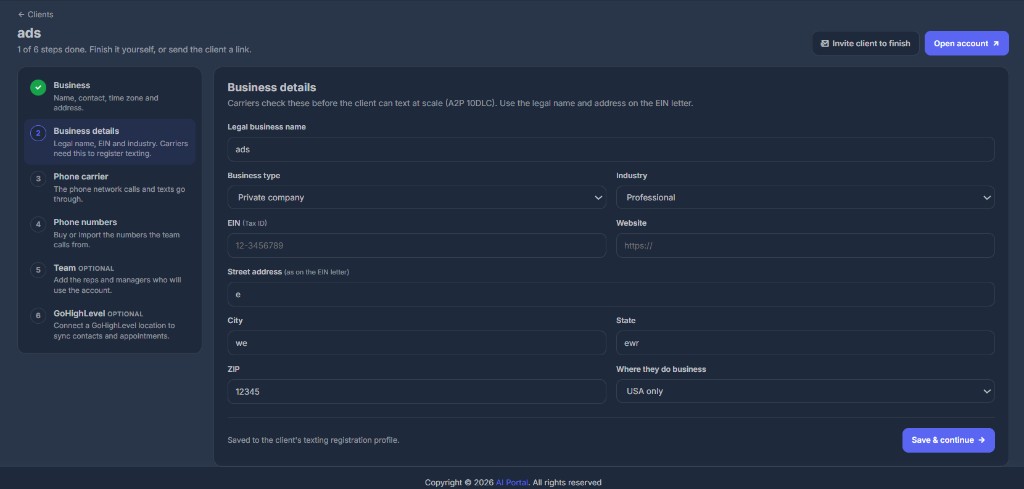
| Field | Notes |
|---|---|
| Legal business name | As on the EIN letter |
| Business type | Private company, public company, non-profit, government, or sole proprietor |
| Industry | Used on the texting registration |
| EIN (Tax ID) | Example format: 12-3456789 |
| Website | Optional |
| Street address | As on the EIN letter |
| City, state, ZIP | Required |
| Where they do business | USA only, USA and Canada, Canada only, or International |
Saved to the client's texting registration profile. Save & continue.
3️⃣ Phone carrier#
Choose the network this client calls and texts through. You can use a different one for every client.
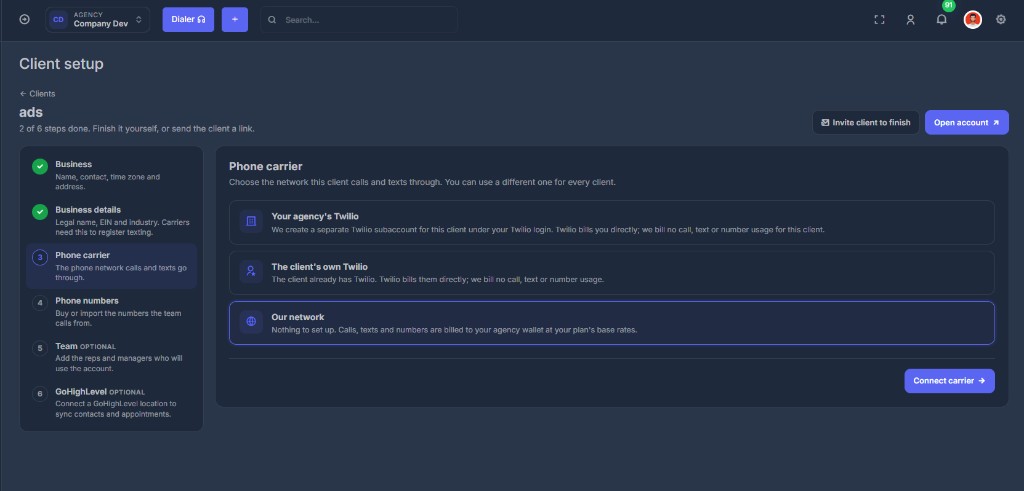
Your agency's Twilio#
We create a separate Twilio subaccount for this client under your Twilio login. Their numbers stay separate.
- Twilio bills you directly
- We bill no call, text, or number usage for this client
- You must have a Twilio login saved under Agency settings
The client's own Twilio#
The client already has Twilio. Paste their Account SID and Auth Token.
- Twilio bills them directly
- We bill no call, text, or number usage
Our network#
Nothing to set up.
- Calls, texts, and numbers are billed to your agency wallet at your plan's base rates
- Turn on auto-recharge so a busy client cannot run the balance dry
Connect carrier saves the choice.
4️⃣ Phone numbers#
Buy local numbers or import ones the client already owns, then turn on spam protection so calls do not show as "Spam Likely".
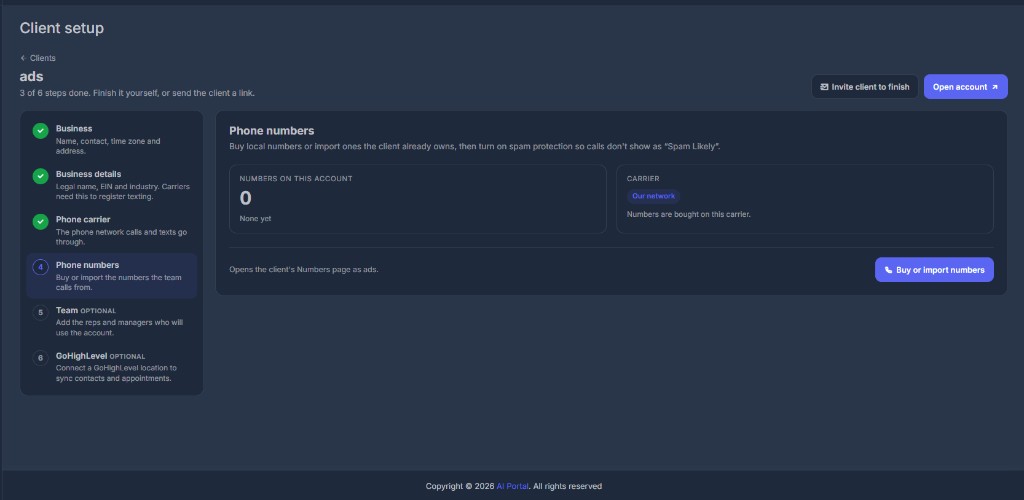
The step shows how many numbers are already on the account and which carrier those numbers will be bought on.
Buy or import numbers opens the client's Numbers page as that client. The setup bar updates when at least one number exists.
You cannot buy numbers until a carrier is connected. If the usage balance is below zero on Our network, new number purchases are blocked until you top up.
5️⃣ Team (optional)#
Add the reps and managers who will dial. Each gets their own sign-in.
Add team members opens the client's team page as them. Skip for now if you will do this later.
6️⃣ GoHighLevel (optional)#
Connect the client's GoHighLevel location to sync contacts, pipelines, and appointments.
Connect GoHighLevel opens their integrations page as them. Skip if they are not on GoHighLevel.
✉️ Invite the client to finish#
On any step after the account exists, click Invite client to finish.
They get a one-time link, valid 7 days, to choose a password and finish the remaining steps. You can keep working on it too.